Instagram Reels API: How to Publish Reels (Graph API)
The Instagram Reels API lets an approved app publish a short vertical video to an Instagram professional account in three HTTP calls: create a media container, check its status until processing finishes, and publish the container. Every third-party scheduler, custom publishing script, and studio pipeline that sends Reels to Instagram without touching a phone runs through this same three-step sequence on Meta's Graph API.
As of 17 October 2026, the latest Graph API version is v26.0, released on 29 July 2026, while Meta's official content publishing guide shows its examples on v25.0. Over the past year Meta has added a second login path that works without a Facebook Page, an Audio API for attaching licensed music, Trial Reels, a paid partnership label, and an AI disclosure flag. At the same time, several vendor blogs repeat out-of-date rules, and Meta's own pages disagree with each other on whether the daily publishing cap is 100 posts or 50 posts. This guide puts every step, parameter, quota, and retry rule in one place, with dates and links to Meta's primary reference pages.
Last checked: 17 October 2026. Meta updates Graph API versions, permissions, and rate limits on a rolling schedule, so check the dates next to every figure below.
On this page
- The Instagram Reels API in one page
- Choose your login path: Facebook Login vs Instagram Login
- Requirements before your first call
- Step 1: create the Reel container
- Step 2: wait for processing and poll status_code
- Step 3: publish the container and read the result
- Resumable uploads for large video files
- Make publishing safe to retry in production
- Rate limits, quotas, and how to check them at runtime
- Video and cover requirements, condensed
- What is new in the Instagram Reels API since 2025
- The errors you will actually hit
- A test checklist before you submit for App Review
- Key takeaways
- Frequently asked questions
- Sources and how this was checked
The Instagram Reels API in one page
Publishing a Reel through the Instagram Reels API takes three calls: create a container on the user's media edge, poll that container's status code until Instagram finishes downloading and transcoding the video, and call the publish edge with the container ID. Nothing appears on the user's profile during step one or step two. The Reel goes public at the moment step three succeeds.
Two details surprise almost every developer who reads Meta's IG User Media reference for the first time. First, in the standard flow your server does not push video bytes in the request body. Instead, you pass a video_url parameter that points to your file on a publicly accessible server, and Meta's servers fetch the video in the background. Second, the Instagram Reels API has no scheduling parameter. Unlike Facebook's Page Reels API, there is no scheduled_publish_time field on an Instagram container, and any container that is not published within 24 hours expires. If your app lets people schedule Reels for next week, your own queue must hold the video and run the three calls at the scheduled minute.
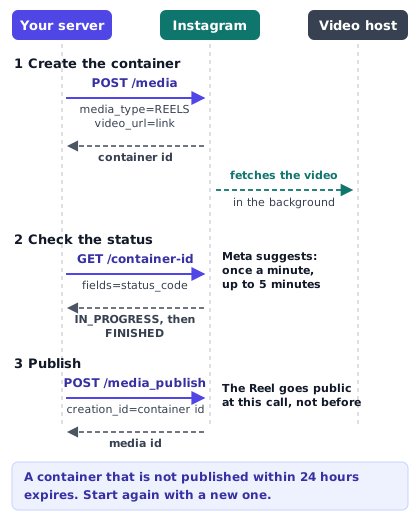
The table below lists the five endpoints you use to create, monitor, publish, inspect, and meter Reels on the Graph API.
| Step | Method and path | Key parameters or fields | What it returns |
|---|---|---|---|
| 1. Create container | POST /{ig-user-id}/media | media_type=REELS, video_url, caption, share_to_feed, cover_url or thumb_offset. | A JSON object with id set to the new IG Container ID. |
| 2. Check status | GET /{ig-container-id} | fields=status_code,status,copyright_check_status. | status_code such as IN_PROGRESS, FINISHED, PUBLISHED, ERROR, or EXPIRED. |
| 3. Publish | POST /{ig-user-id}/media_publish | creation_id={ig-container-id}. | A JSON object with id set to the live IG Media ID. |
| 4. Read live media | GET /{ig-media-id} | fields=id,permalink,shortcode,media_type,media_product_type,timestamp. | The live post details. Note that media_type is VIDEO and media_product_type is REELS. |
| 5. Check quota | GET /{ig-user-id}/content_publishing_limit | fields=config,quota_usage. | Your rolling 24-hour usage and the quota_total object from Meta. |
Watch out for the field values on step four. When you read a published Reel back from GET /{ig-media-id}, Instagram sets media_type to VIDEO, not REELS. You asked for media_type=REELS when you created the container, so expecting REELS back on the published object is a common bug in analytics and webhook code. Always request media_product_type as well. On a published Reel, media_product_type returns REELS, while media_type returns VIDEO.
Choose your login path: Facebook Login vs Instagram Login
Before you write a line of code or ask a user for permission, you have to choose between Meta's two login paths. Meta's Instagram Platform overview divides the platform into two tracks: the Instagram API with Facebook Login and the Instagram API with Instagram Login. Both can publish Reels to an Instagram professional account, and both use the same three-call container flow, yet they use different hostnames, different permission scopes, different account prerequisites, and different extra features.
Path 1: Instagram API with Facebook Login
This is the older, broader path, documented under Content Publishing with Facebook Login. Every request goes to graph.facebook.com (and rupload.facebook.com when you use resumable uploads).
To use this path, the Instagram professional account must be linked to a Facebook Page, and the person who logs in must be able to perform tasks on that Page. Your app asks for Facebook Login scopes: instagram_basic, instagram_content_publish, and pages_read_engagement. If your app users manage their Page through a Business Manager role, Meta's guide adds ads_management and ads_read to that list.
Why pick the route that forces every user to link a Facebook Page? Because several capabilities in Meta's documentation work only on the Facebook Login path:
- Resumable video uploads (
upload_type=resumableviarupload.facebook.com) are documented for Facebook Login for Business apps only. - The Instagram Audio API (released on 1 June 2026 for searching and attaching licensed music or original sound to a Reel) states in its guide that it is not supported on the Instagram API with Instagram Login.
- Paid partnership labels at publish time (
is_paid_partnershipandbranded_content_sponsor_ids, added on 22 April 2026) are listed in the changelog for the Facebook Login path only. - Cross-posting to Facebook Reels requires a Facebook Page token anyway, so one Facebook Login flow can connect both the Facebook Page and its linked Instagram account in a single trip.
Path 2: Instagram API with Instagram Login
This is the newer path, documented under Content Publishing with Instagram Login. Requests go to graph.instagram.com.
The big advantage here is onboarding friction. Users sign in with their Instagram credentials directly, and their Instagram professional account does not need to be connected to a Facebook Page. For creators who never set up a Facebook Page or who got stuck in Meta's Page-linking menus, that removes the single biggest drop-off step. The permission names are also specific to this path: instagram_business_basic and instagram_business_content_publish.
The trade-off is what you leave behind. You cannot post to a Facebook Page from an Instagram Login token. You cannot use the resumable upload endpoint on rupload.facebook.com. You cannot call the Instagram Audio API, and you cannot set the paid partnership label at publish time.
Side-by-side comparison of the two paths
The table summarises what changes between the two tracks as of 17 October 2026.
| Feature or rule | Instagram API with Facebook Login | Instagram API with Instagram Login |
|---|---|---|
| API host | graph.facebook.com. | graph.instagram.com. |
| Instagram account type | Professional (Business or Creator). | Professional (Business or Creator). |
| Linked Facebook Page required | Yes, linked to a Page the user manages. | No Page required. |
| Core publishing scopes | instagram_basic, instagram_content_publish, pages_read_engagement. | instagram_business_basic, instagram_business_content_publish. |
| Extra scopes for Business Manager Page roles | ads_management, ads_read. | Not applicable. |
| Standard URL-based Reel publishing | Supported. | Supported. |
| Resumable upload (rupload.facebook.com) | Supported for Facebook Login for Business apps. | Not supported. |
| Instagram Audio API (1 June 2026) | Supported. | Not supported per Meta's Audio API guide. |
| Paid partnership label (22 April 2026) | Supported. | Not listed for this path. |
| AI disclosure flag (is_ai_generated, 22 June 2026) | Supported. | Supported. |
Which path PublishClip uses, and why
PublishClip uses the Instagram API with Facebook Login (graph.facebook.com). That is a deliberate choice: PublishClip posts both Facebook Reels and Instagram Reels from one upload, and Facebook Reels can only be published to a Facebook Page. By signing in with Facebook once, a user connects their Page and its linked Instagram professional account at the same time. If a user's Instagram account does not appear during connection, it is almost always because the Page link is missing or incomplete, which our guide on connecting Instagram to a Facebook Page walks through step by step.
If you are building an Instagram-only tool for solo creators and you never need Audio API tracks, resumable byte uploads, or Facebook Page cross-posting, the Instagram Login path will save you support tickets. If you need any of those features or you also publish to Facebook Pages, build on the Facebook Login path.
Requirements before your first call
Even in a test environment, your first POST /{ig-user-id}/media call will fail if the account, Page role, access level, or Page authorization is out of place. Check these four areas before you debug your HTTP client.
1. Accounts, Page links, and Page tasks
The Instagram Reels API works only with Instagram professional accounts, which means a Business account or a Creator account. Personal Instagram accounts cannot be published to through the API on either login path, regardless of whether the account is public or private. Switching a personal account to a Business or Creator account inside the Instagram app is free and takes a minute.
On the Facebook Login path, two more rules apply from Meta's Instagram Platform overview:
- The Instagram professional account must be connected to a Facebook Page. A loose Page and a loose Instagram account under the same person's email are not enough; they must be linked in the Page's Linked Accounts settings or in Instagram's professional settings.
- The app user must be able to perform tasks on that Page. In the Facebook interface, Meta names the required tasks as Content or Full control. In the Graph API's
tasksarray on/me/accounts, those correspond toPROFILE_PLUS_CREATE_CONTENTandPROFILE_PLUS_FULL_CONTROL. Older tutorials often tell you to check forMANAGEorCREATE_CONTENTroles from the classic Pages experience, so keep both in mind if you inspect the tasks list in code.
How do you find the {ig-user-id} that appears in every endpoint path? It is not the numeric ID from an Instagram profile scraper, and it is not the Facebook Page ID. On the Facebook Login path, you call GET /me/accounts?fields=id,name,access_token,instagram_business_account{id,username} with the user's access token. Each Page that has a linked professional account returns an instagram_business_account object, and its id field is the {ig-user-id} you pass to POST /{ig-user-id}/media.
2. Access levels, App Review, and Business Verification
Every permission in a Meta developer app has two access tiers: Standard Access and Advanced Access.
- Standard Access is what your app has the moment you create it. With Standard Access, your app can call the Instagram Reels API only for accounts owned or managed by people who have an active role on the app in the Meta App Dashboard (such as Administrators, Developers, or Testers) while the app is set up for testing or internal use. If you are building an internal script to publish Reels to your own company's accounts, or you are testing your integration before launch, Standard Access is all you need. You do not need to pass App Review to publish to your own accounts.
- Advanced Access is required as soon as your app needs to publish Reels for accounts you do not own or manage — in other words, real customers signing up on your website. Getting Advanced Access for
instagram_content_publish(orinstagram_business_content_publish) requires passing Meta App Review and completing Business Verification for your organization in Meta Business Suite.
Do not underestimate the time App Review takes. You have to record a screen capture showing a working login flow and a real publish action inside your app, explain why your app needs each permission, and provide a live privacy policy URL and a data deletion instructions URL. Request only the permissions your code actually uses; asking for an extra scope you cannot demonstrate on screen is the fastest way to get a submission rejected.
3. Tokens and how long they last
Short-lived user access tokens from a browser login expire in roughly an hour or two. Before you store a token for background publishing, exchange it for a long-lived token:
- On the Instagram Login path, long-lived Instagram user tokens last 60 days and can be refreshed before they expire as long as the user has not revoked access.
- On the Facebook Login path, you exchange the short-lived Facebook user token at
GET /oauth/access_token?grant_type=fb_exchange_tokenfor a 60-day long-lived user token, and then readGET /me/accountsusing that long-lived user token. Page access tokens obtained from a long-lived user token do not carry a fixed expiry timestamp in the same way, though they can still be invalidated at any moment if the user changes their Facebook password, hits a security checkpoint, loses their task access on the Page, or removes your app in Facebook settings.
4. Page Publishing Authorization (PPA) and two non-rules
Meta's content publishing guide carries an explicit warning about Page Publishing Authorization (PPA): if an Instagram professional account is connected to a Facebook Page that requires PPA, the API will block all publishing attempts until the Page manager completes PPA inside Facebook. Meta recommends advising your app's users to complete PPA ahead of time, because a Page can be flagged for it after the account is already connected to your app.
It is also worth clearing up two claims that still appear in older blog posts:
- Two-factor authentication: As of 17 October 2026, neither Meta's content publishing guide nor its Instagram Platform overview mentions two-factor authentication as a blanket requirement for calling the publishing API (outside of pages subject to Page Publishing Authorization). Enabling two-factor authentication is good security practice, and PPA itself involves verifying the manager's account, but do not tell users that a missing 2FA toggle is why a normal API call returned a syntax error.
- ASCII-only video URLs: Some older developer articles claim that
video_urlmust contain only ASCII characters. Meta's current IG User Media reference does not state an ASCII-only rule; standard URL percent-encoding of special characters in your URL path and query string is the normal HTTP rule to follow.
5. Graph API versions and deprecation dates
Every Graph API path starts with a version prefix such as /v25.0/ or /v26.0/. Meta keeps each version alive for roughly two years from the release of the version that follows it. According to the Graph API changelog, read on 17 October 2026, here is the active schedule:
| Graph API version | Release date | Available until | Notes as of 17 October 2026 |
|---|---|---|---|
| v26.0 | 29 July 2026 | To be announced | Latest version. |
| v25.0 | 18 February 2026 | 29 July 2028 | Used in Meta's current content publishing code samples. |
| v24.0 | 8 October 2025 | 18 February 2028 | Active and supported. |
| v23.0 | 29 May 2025 | 8 October 2027 | Active and supported. |
| v22.0 | 21 January 2025 | 20 May 2027 | Default version in PublishClip's social-publish config today, and used in Meta's Audio API examples. |
Keep your Graph version in an environment variable (META_GRAPH_VERSION in PublishClip's configuration) rather than hardcoding /v25.0/ in twenty places, so you can test and upgrade in a single change before a version retires.
Step 1: create the Reel container
Every Reel starts with a POST request to /{ig-user-id}/media. This call does not publish anything to Instagram. It creates an IG Container, which is a staging object where Instagram downloads your video file, checks that the audio and video streams meet its specification, generates a cover frame, and runs copyright checks.
The request
Here is an illustrative curl call using Graph API v25.0 and placeholder values. Do not copy placeholder tokens or IDs into production; substitute your own {ig-user-id}, signed video link, and access token.
# Illustration only — replace placeholders with your own IDs and links
curl -X POST "https://graph.facebook.com/v25.0/17841400000000000/media" \
  -H "Content-Type: application/x-www-form-urlencoded" \
  --data-urlencode "media_type=REELS" \
  --data-urlencode "video_url=https://media.example.com/reels/clip-2026-10-17.mp4?sig=placeholder" \
  --data-urlencode "caption=Fresh batch out of the roaster this morning. #coffeeroaster #specialtycoffee" \
  --data-urlencode "share_to_feed=true" \
  --data-urlencode "thumb_offset=2500" \
  --data-urlencode "access_token=EAABs...placeholder_token"
When the call succeeds, Instagram responds immediately — before it has finished downloading your video — with the ID of the newly created container:
{
  "id": "17895695668004550"
}
Save that id to your database the instant you receive it. If your worker process restarts two seconds later, that id is how your app checks the container instead of creating a duplicate one.
Every parameter on POST /{ig-user-id}/media for Reels
The IG User Media reference documents the parameters accepted when media_type is REELS. The table below lists each one, what it controls, and the rules Meta states as of 17 October 2026.
| Parameter | Required | Type | What it does and Meta's documented rules |
|---|---|---|---|
| media_type | Yes | String | Must be set to REELS. (Setting VIDEO is legacy and does not create a Reel container in current versions.) |
| video_url | Yes (unless resumable) | URL string | Publicly accessible URL of the MP4 or MOV video file. Omitted only when upload_type=resumable is used. |
| upload_type | No | String | Set to resumable when uploading raw bytes or a hosted header via rupload.facebook.com (Facebook Login for Business apps only). |
| caption | No | String | Caption text. Meta's API reference states a maximum of 2,200 characters, up to 30 hashtags, and up to 20 @mentions. See the hashtag note below. |
| share_to_feed | No | Boolean | Set true to show the Reel in both the main Profile Grid / Feed and the Reels tab, or false to show it only in the Reels tab. |
| cover_url | No | URL string | Public URL of a JPEG cover image (up to 8 MB, sRGB, 9:16 recommended). If both cover_url and thumb_offset are sent, Meta prefers cover_url. |
| thumb_offset | No | Integer (ms) | Time offset in milliseconds (default 0) for picking a video frame as the cover. Must fall within the video's duration, or Meta returns subcode 2207057. |
| audio_name | No | String | Custom name for the Reel's original audio track. Meta notes that audio can only be renamed once, either at creation or later in the app. |
| audio_configuration | No | JSON object | Used with the Instagram Audio API (Facebook Login only): holds audio_id, audio_volume (0 to 100, default 100), and video_volume (0 to 100, default 100). |
| collaborators | No | Array of strings | Up to 3 Instagram usernames invited as collaborators on the Reel. Invitations must still be accepted by those accounts. |
| location_id | No | Facebook Page ID | ID of a Facebook Page that has geographic location data associated with it, discovered via the Pages Search API. |
| user_tags | No | Array of objects | Array of {username, x, y} objects for tagging public Instagram users in the Reel, where x and y are optional on Reels. |
| trial_params | No | JSON object | Added 3 December 2025 for Trial Reels: passes graduation_strategy set to MANUAL or SS_PERFORMANCE. |
| is_ai_generated | No | Boolean | Added 22 June 2026: set true to apply Instagram's AI-generated content label to the Reel. |
| is_paid_partnership | No | Boolean | Added 22 April 2026 (Facebook Login only): marks the Reel with a paid partnership label when used with branded_content_sponsor_ids. |
| branded_content_sponsor_ids | No | Array | Sponsor Instagram user IDs paired with is_paid_partnership on the Facebook Login path. |
Two parameters are conspicuous by what they cannot do or how they behave:
alt_textis not supported for Reels. Meta's IG User Media reference explicitly states thatalt_textapplies to images and image carousels, not Reels. Do not sendalt_texton amedia_type=REELScall.- Avoid sending both
cover_urlandthumb_offset. Meta's reference says that if you specify bothcover_urlandthumb_offset,cover_urlis preferred andthumb_offsetis ignored. In PublishClip'sMetaDriver, we check whether the media has a customcover_urlfirst and sendthumb_offsetonly in theelseifbranch, so the request always makes our intent clear. Our Instagram Reel cover guide explains how covers crop in the 9:16 Reels tab, the 3:4 profile grid, and the 1:1 feed square. - The 30-hashtag vs 5-hashtag tension. Meta's IG User Media API reference page still lists a maximum of 30
#hashtags incaption. However, on 18 December 2025 Instagram announced that it was gradually limiting captions in the app to 5 hashtags per Reel or post. Meta has not documented in the Graph API reference how the API treats captions with 6 to 30 hashtags during or after that rollout. Until Meta updates the reference page, the safest guidance for users is to stick to 5 or fewer hashtags; see our Instagram Reels size and specs guide for the full caption breakdown.
The rules your video_url must pass
When you call POST /{ig-user-id}/media with video_url, Meta's servers make an outbound HTTP request to fetch your file. If that fetch fails, the container moves to ERROR (or the call fails outright with error 9004 and subcode 2207052, "The media could not be fetched from this uri"). Follow these rules on your media host:
- Publicly reachable at the moment of the attempt. Meta states that the media must be hosted on a publicly accessible server at the time of the attempt. You do not need to leave your storage bucket wide open forever. The standard production pattern — and the one PublishClip uses — is to keep videos in a private S3-compatible bucket and generate a pre-signed URL right when Step 1 runs, with a time-to-live (TTL) of at least 30 to 60 minutes so Meta has plenty of time to download and retry if its fetcher is busy.
- No authentication headers, login cookies, or HTML wrapper pages. A Google Drive "view" link, a Dropbox preview page, or a URL behind basic auth returns an HTML page instead of an MP4 stream. Meta's fetcher reads the wrong content type and rejects the container.
- Do not block Meta's crawler. On the Facebook Reels API page, Meta notes that its fetcher uses the
facebookexternalhit/1.1user agent, respectsrobots.txtblocks (rejecting hosts that disallow its crawler), and rejectsfbcdn.netURLs. Make sure your CDN, WAF, orrobots.txtdoes not blockfacebookexternalhit/1.1or rate-limit Meta's IP ranges when several Reels go out at once. - URL-encode query strings and file names properly. If your object key contains spaces, brackets, or non-ASCII characters, percent-encode them before building the URL, or use clean UUID / slug keys in object storage so the signed signature never breaks on a double-encoded character.
Step 2: wait for processing and poll status_code
Because video transcoding and copyright checks take time, you cannot call media_publish right after POST /{ig-user-id}/media. If you try, Meta responds with error code 9007 and subcode 2207027: "The media is not ready for publishing, please wait for a moment".
Instead, you poll the container with GET /{ig-container-id}?fields=status_code,status:
# Illustration only — replace container ID and token with your own
curl -X GET "https://graph.facebook.com/v25.0/17895695668004550?fields=status_code,status,copyright_check_status&access_token=EAABs...placeholder_token"
While Instagram is still fetching and checking your file, the response looks like this:
{
  "status_code": "IN_PROGRESS",
  "id": "17895695668004550"
}
When processing succeeds, status_code changes to FINISHED:
{
  "status_code": "FINISHED",
  "id": "17895695668004550"
}
All five status_code values and what your app should do
Meta's IG Container reference defines five values for status_code. Every production integration should handle all five explicitly.
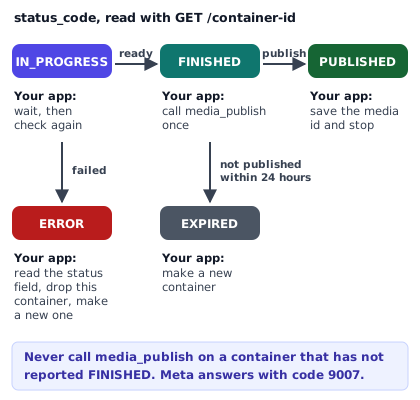
| status_code | Meta's definition | What your app should do |
|---|---|---|
| IN_PROGRESS | The container is still in the publishing / processing phase. | Do not call media_publish. Schedule the next status check after your polling interval, up to a bounded maximum number of checks. |
| FINISHED | The container is ready to be published. | Proceed to Step 3 and call POST /{ig-user-id}/media_publish with creation_id set to this container ID. |
| PUBLISHED | The container has already been published. | Do not call media_publish again. Mark the job as published in your database and stop polling. |
| ERROR | The container failed to complete the publishing process. | Read the status field on the same container (which holds the error subcode or message), clear the saved container_id so a future retry creates a fresh container, and surface the error. |
| EXPIRED | The container was not published within 24 hours and has expired. | An expired container can never be revived. Clear the saved container_id and start again at Step 1 with a new container. |
Notice why requesting fields=status_code,status (both fields, not just status_code) matters. When status_code is ERROR, the separate status field on the container carries the underlying error subcode or message — for example, telling you whether the video format was unsupported (2207026) or the file took too long to download (2207003). You can also query copyright_check_status on the container, which returns a matches_found boolean and a status of completed, error, in_progress, or not_started.
How often to poll: Meta's guidance vs real-world queues
Meta's content publishing guide suggests querying a container's status once per minute, for no more than 5 minutes. By default, any container not published within 24 hours expires.
In practice, many short 15-to-60-second H.264 Reels finish processing in 15 to 45 seconds. If a user clicked Post now in your UI and is watching a status badge, waiting 60 seconds before the very first check makes your app feel slow. In PublishClip's config/social-publish.php and MetaDriver.php, the default polling interval is 10 seconds for up to 30 checks (which covers the same 5-minute window Meta suggests, while catching fast encodes on the first or second check).
Whichever interval you pick, two rules keep you out of trouble:
- Watch your Business Use Case rate limit. Every
GET /{ig-container-id}call counts against your app's Graph API call budget. If you publish hundreds of Reels at once for low-impression accounts, polling every 2 seconds will burn through your rate limit. Polling every 15 to 60 seconds (or using a progressive backoff such as 10s, 20s, 30s, 60s) is much gentler. - Never
sleep()inside a queue worker. If 20 users publish Reels at the same minute and each worker sleeps for 60 seconds inside a PHP or Node worker thread, all 20 workers sit idle waiting on Meta. Dispatch a delayed check job back onto your queue and free the worker immediately.
Step 3: publish the container and read the result
Once GET /{ig-container-id}?fields=status_code returns FINISHED, you publish the Reel with a single POST to /{ig-user-id}/media_publish, passing the container ID as creation_id:
# Illustration only — replace IDs and token with your own
curl -X POST "https://graph.facebook.com/v25.0/17841400000000000/media_publish" \
  -H "Content-Type: application/x-www-form-urlencoded" \
  --data-urlencode "creation_id=17895695668004550" \
  --data-urlencode "access_token=EAABs...placeholder_token"
When the call succeeds, Instagram returns the live IG Media ID:
{
  "id": "17920112233445566"
}
Fetching the live permalink
The id returned by media_publish is Meta's internal graph ID for the published post, not the public URL. To show the user a clickable "View on Instagram" link, make one GET request on the new media ID:
# Illustration only — replace media ID and token with your own
curl -X GET "https://graph.facebook.com/v25.0/17920112233445566?fields=id,permalink,shortcode,media_type,media_product_type,timestamp&access_token=EAABs...placeholder_token"
That returns a payload like this:
{
  "id": "17920112233445566",
  "permalink": "https://www.instagram.com/reel/DBx9Yz0AbCd/",
  "shortcode": "DBx9Yz0AbCd",
  "media_type": "VIDEO",
  "media_product_type": "REELS",
  "timestamp": "2026-10-17T14:30:12+0000"
}
Store permalink alongside the external post ID so your dashboard can link straight to the live Reel without calling the Graph API again on every page load.
Resumable uploads for large video files
When a video file is large or your storage architecture does not expose a public URL, Meta offers a resumable upload session for Instagram Reels. Read one limitation first: Meta's documentation states that resumable uploads via rupload.facebook.com are available only for Facebook Login for Business apps. They are not supported on the Instagram API with Instagram Login.
How the resumable flow differs in Step 1
Instead of passing video_url when you create the container, you pass upload_type=resumable:
# Illustration only — Step 1A: create a resumable container
curl -X POST "https://graph.facebook.com/v25.0/17841400000000000/media" \
  -H "Content-Type: application/x-www-form-urlencoded" \
  --data-urlencode "media_type=REELS" \
  --data-urlencode "upload_type=resumable" \
  --data-urlencode "caption=Behind the scenes at the workshop." \
  --data-urlencode "access_token=EAABs...placeholder_token"
Instagram returns both the container id and a uri on rupload.facebook.com:
{
  "id": "17895695668004550",
  "uri": "https://rupload.facebook.com/ig-api-upload/v25.0/17895695668004550"
}
Sending the video to rupload.facebook.com
Next, you POST to that rupload.facebook.com URI with an Authorization: OAuth <access_token> header. You can either stream local bytes with offset and file_size headers, or pass a hosted file_url header:
# Illustration only — Step 1B: upload bytes to rupload.facebook.com
curl -X POST "https://rupload.facebook.com/ig-api-upload/v25.0/17895695668004550" \
  -H "Authorization: OAuth EAABs...placeholder_token" \
  -H "offset: 0" \
  -H "file_size: 48234496" \
  --data-binary "@local-reel.mp4"
Once the upload call returns "success": true, you poll GET /{ig-container-id}?fields=status_code and call POST /{ig-user-id}/media_publish in exactly the same way as the standard flow. Note that for Facebook Page Reels (POST /{page-id}/video_reels), rupload.facebook.com is the standard second step for every upload, whereas for Instagram Reels most web apps find video_url simpler because Step 1 creates the container and starts the download in a single request.
Make publishing safe to retry in production
Tutorial scripts run all three calls in one linear function with a sleep(30) in the middle. In a real web app, workers time out, network sockets drop after a POST has already reached Meta, and users click "Retry" when a post stalls. If a naive worker retries from the top, it creates a second container and publishes the same Reel twice.
Here is how PublishClip's MetaDriver (src/Drivers/Meta/MetaDriver.php) and queue job (src/Jobs/PublishToPlatform.php) make every Instagram and Facebook Reel publish safe to retry.
Six rules from PublishClip's production driver
- Guard at the door. The very first check in
MetaDriver::publish()isif ($target->isPublished()). If a target already has a published status and an external post ID, the driver returns immediately without touching the network. - At most one irreversible write per execution. When a job runs for a brand-new Instagram target (
! $target->container_id), it verifies that the video exists in storage, callsPOST /{ig-user-id}/mediaonce, savescontainer_idandpoll_count = 0to the database, transitions the target toProcessing, and returns a pending outcome. It does not poll or publish in that same run. - Dispatch a delayed follow-up job instead of sleeping or releasing. In Laravel queues, calling
$this->release(10)increments the job'sattemptscounter, so a container that takes two minutes to transcode would exhaust a 3-try limit while doing nothing wrong. Instead,PublishToPlatformdispatches a fresh delayed copy of itself (delay(now()->addSeconds(10))) and exits cleanly. Theattemptscounter is reserved for real exceptions. - Prevent overlapping workers without dropping the next poll.
PublishToPlatformuses Laravel'sWithoutOverlapping('social-publish-target:'.$this->targetId)->dontRelease()->expireAfter(600)middleware rather thanShouldBeUnique. A unique lock would still be held at the momenthandle()dispatches the next 10-second poll, causing the queue to drop the follow-up silently. - Always check container status before calling
media_publishon a resume. Suppose your worker sawFINISHED, transitioned the target toPublishing, calledPOST /{ig-user-id}/media_publish, and then the HTTP connection timed out at 60 seconds before Meta's response arrived. Did the Reel go live or not? When the retry runs,MetaDriverstill callsGET /{container-id}?fields=status_code,statusfirst. If Meta answersPUBLISHED, the driver marks the target published and stops — never callingmedia_publisha second time. If Meta answersFINISHED, the driver knows the previous publish call did not complete and safely callsmedia_publish. - Reset
container_idonERRORandEXPIRED. A container inERRORcan never be published, soMetaDriversetscontainer_id = nullandpoll_count = 0before throwing the error. If the user fixes the issue and clicks Retry, the retry starts cleanly at Step 1. OnEXPIRED, the driver clearscontainer_idand returns a pending outcome so the next tick creates a fresh container automatically.
How that compares with Facebook Page Reels in the same driver
If your app posts to both Instagram and Facebook Pages (as PublishClip does), note that Facebook's Reels Publishing API for Pages uses a slightly different three-step state machine:
- Step 1:
POST /{page-id}/video_reelswithupload_phase=start, which returnsvideo_id. Savevideo_idasupload_session_id. - Step 2:
POSTtohttps://rupload.facebook.com/video-upload/{version}/{video-id}withAuthorization: OAuth {page_token}and afile_urlheader pointing to your signed video URL. - Step 3:
POST /{page-id}/video_reelswithupload_phase=finish,video_id,video_state=PUBLISHED, anddescriptionset to the caption. If Step 3 times out and resumes,MetaDrivercallsGET /{video-id}?fields=statusand checks whetherstatus.publishing_phase.statusis alreadycompletebefore calling finish again.
For readers who want to schedule Reels across both platforms without building their own queue, our guide on how to schedule Instagram Reels explains how tools hold and time these calls.
Rate limits, quotas, and how to check them at runtime
When your app scales beyond a handful of test posts, you meet three separate limits on the Instagram Reels API: the daily publishing quota, the daily container creation cap, and the Graph API Business Use Case (BUC) call rate limit.
1. The 100-post vs 50-post daily publishing conflict in Meta's docs
How many posts can an Instagram professional account publish through the API in 24 hours? As of 17 October 2026, Meta's own documentation gives two different numbers on two pages — and even on the same page:
- On the Content Publishing guide, the Rate Limit section states: "Instagram professional accounts are limited to 100 API-published posts within a 24-hour moving period. Carousels count as a single post."
- On that very same Content Publishing guide, the Carousel Posts section states: "Accounts are limited to 50 published posts within a 24-hour period."
- On the IG User Content Publishing Limit reference, the
config.quota_totalfield description states: "The maximum number of IG Containers the IG User can publish within thequota_durationperiod (currently 50)."
Why do both numbers appear? Meta raised the limit from 25 to 50 and later to 100 in parts of its documentation without updating every reference table. Because you cannot tell from prose alone which number Meta enforces on a given account, do not rely on a hardcoded guess alone. Query the account's live quota at runtime with GET /{ig-user-id}/content_publishing_limit:
# Illustration only — check the account's live publishing quota and usage
curl -X GET "https://graph.facebook.com/v25.0/17841400000000000/content_publishing_limit?fields=config,quota_usage&access_token=EAABs...placeholder_token"
Meta returns both your current usage and the active quota_total and quota_duration (86,400 seconds, or 24 hours):
{
  "data": [
    {
      "config": {
        "quota_total": 50,
        "quota_duration": 86400
      },
      "quota_usage": 3
    }
  ]
}
Read config.quota_total and quota_usage from that response whenever you want to show a user their remaining daily allowance.
2. The 400-container cap
Creating a container without publishing it still costs quota. The IG User Media reference states that an Instagram user can create at most 400 containers within a rolling 24-hour period. If a buggy retry loop creates a fresh container every 10 seconds when a video URL is broken, it will burn all 400 containers in just over an hour and lock the account out of creating new posts for the rest of the day.
3. Business Use Case (BUC) rate limits and headers
Beyond publishing caps, every HTTP request (POST or GET) counts toward Meta's API rate limits. According to Meta's Graph API rate limiting guide, read on 17 October 2026, calls made with an Instagram token are metered by the Instagram Business Use Case formula:
$$\text{Calls within 24 hours} = 4800 \times \text{Number of Impressions}$$
Here "Impressions" is the number of impressions on the Instagram professional account. Even an account with zero impressions gets a baseline allowance so it can publish and read its profile, but high-frequency polling across many zero-impression accounts will trigger throttling faster than on large accounts.
Every Graph API response includes usage headers you can inspect before you get throttled:
X-Business-Use-Case-Usage: a JSON object keyed by business/account ID containing up to 32 usage objects, each reportingcall_count,total_cputime,total_time(as percentages from 0 to 100),type, andestimated_time_to_regain_access(in minutes).X-App-Usage: a JSON object withcall_count,total_cputime, andtotal_timepercentages for app-level limits.
When you hit a rate limit, Meta returns one of these error codes:
- Code
80002: Instagram Business Use Case rate limit reached. - Code
4: Application-level rate limit reached. - Code
17: User-level rate limit reached. - Code
32: Pages API rate limit reached. - Code
613: Custom rate limit reached.
Meta's rule on the rate-limiting page is direct: "When the limit has been reached, stop making API calls." Read estimated_time_to_regain_access from the header (or back off exponentially) before trying again.
Video and cover requirements, condensed
Even when your permissions, tokens, and container code are flawless, Instagram will move a container to ERROR (or reject it with code 352 / subcode 2207026) if the video file violates Meta's container, codec, or dimension rules.
The table below condenses the official Reel video and cover specifications from Meta's IG User Media reference as of 17 October 2026, alongside the stricter limits that apply if you also cross-post the same file to Facebook Reels or through PublishClip.
| Item | Instagram Reels API specification | Facebook Page Reels API specification | PublishClip browser output |
|---|---|---|---|
| Container format | MOV or MP4 (MPEG-4 Part 14), no edit lists, moov atom at the front. | MP4 recommended. | MP4 with faststart (moov at the front). |
| Video codec | H.264 or HEVC, progressive scan, closed GOP, 4:2:0 chroma subsampling. | H.264, H.265, VP9, or AV1; closed GOP of 2 to 5 seconds; 4:2:0; progressive. | H.264 (8-bit yuv420p recommended). |
| Audio codec | AAC, up to 48 kHz sample rate, 1 or 2 channels (mono or stereo), max 128 kbps. | AAC-LC, stereo, 48 kHz, 128 kbps or more. | AAC stereo at 128 kbps. |
| Aspect ratio | 9:16 recommended (API accepts 0.01:1 to 10:1). | 9:16. | 9:16 required. |
| Resolution | Max horizontal width 1,920 pixels (1080x1920 standard for 9:16). | 1080x1920 recommended, 540x960 minimum. | Up to 1080x1920. |
| Frame rate | 23 to 60 FPS. | 24 to 60 FPS (fixed frame rate). | 30 FPS standard. |
| Video bitrate | VBR, maximum 25 Mbps. | Not stated as a hard cap. | Target VBR under 25 Mbps. |
| Duration | 3 seconds to 15 minutes. | 3 seconds to 90 seconds. | 3 seconds to 90 seconds (so one clip fits both). |
| Maximum file size | 300 MB. | Not stated on the Reels API guide. | Capped well under 300 MB. |
| Cover image | JPEG up to 8 MB, sRGB, 9:16 recommended (feed uses middle 1:1 square). | No cover parameter on video_reels. | Supported for Instagram via cover_url or thumb_offset. |
Two practical lessons stand out when you encode files for the API:
- Watch horizontal width on 4K vertical videos. A 4K vertical video (
2160x3840) has a horizontal width of2160pixels, which exceeds Meta's1920-pixel maximum width. Even if the file is under 100 MB, the API can reject it. Downscale vertical exports to1080x1920. - Default FFmpeg encodes vs Meta's spec. A default
ffmpeg -i in.mov out.mp4command puts themoovatom at the end of the file and writes two edit lists (edts/elstboxes). Passing-movflags +faststart -use_editlist 0 -bf 0places themoovindex at the front and removes edit lists while keeping audio and video starting at0.000. For the full tested FFmpeg command, crop math, and length rules, read our Instagram Reels size and specs guide and our Facebook Reels size and specs guide.
What is new in the Instagram Reels API since 2025
If you last read Meta's documentation in 2024, five additions and one major metrics removal in the Instagram Platform changelog have changed how apps build on the API.
1. The Instagram Audio API and media_audio_type (1 June 2026)
For years, the most common complaint about third-party schedulers was that API-published Reels could only use the audio baked into the uploaded MP4 file. On 1 June 2026, Meta released the Instagram Audio API and added the media_audio_type field (MUSIC or ORIGINAL_SOUND) when reading Media objects.
Here is how the Audio API works and what its limitations are, read from Meta's guide on 17 October 2026:
- Facebook Login apps only. Meta's Audio API guide states explicitly: "This API is not supported on the Instagram API with Instagram Login." It requires an Instagram Business or Creator account connected to a Facebook Page, plus
instagram_basicandinstagram_content_publish. - Searching for audio (
GET /ig_audio). You queryGET /ig_audiowithaudio_typeset tomusicororiginal_soundand an optionalsearch_query. If you omitsearch_query, it returns trending audio. You can also inspect a single track withGET /{ig-audio-id}, which returns metadata and a temporary preview URL that expires after about 1.5 days. - Attaching audio to a Reel container. When creating the Reel container in Step 1 (
POST /{ig-user-id}/media), you pass anaudio_configurationobject:
{
  "audio_id": "123456789012345",
  "audio_volume": 80,
  "video_volume": 20
}
Both audio_volume and video_volume take integers from 0 to 100 and default to 100. Setting video_volume to 0 mutes the original video track and plays only the attached library audio; setting both mixes them.
Read Meta's three caveats before promising full in-app music parity to your users:
- "This API returns audio that has been authorized for third party use."
- "The available selection may vary from what appears in the native app."
- "Previewing a Reel with attached audio is not supported."
Also note a minor documentation mismatch on Meta's site: while the 1 June 2026 changelog and the Audio API guide document attaching MUSIC and ORIGINAL_SOUND, the older POST /{ig-user-id}/media reference page still carries a line saying music tagging is only available for original audio. And because the Audio API guide's sample URLs contain minor formatting typos on Meta's page, construct your requests from the parameter definitions above. (PublishClip does not attach library audio through the Audio API today; it publishes the audio track inside your uploaded video.)
2. AI-generated content label: is_ai_generated (22 June 2026)
On 22 June 2026, Meta added the boolean is_ai_generated parameter to media container creation on both the Facebook Login path and the Instagram Login path. Passing is_ai_generated=true on POST /{ig-user-id}/media applies Instagram's AI disclosure label to the published Reel. (For carousel posts, Meta notes that is_ai_generated is set on the parent carousel container, not on individual child items.) PublishClip does not yet send is_ai_generated on Instagram containers in MetaDriver.
3. Paid partnership label at publish time (22 April 2026)
On 22 April 2026, Meta added support on the Facebook Login path for tagging a post as a paid partnership at publish time using is_paid_partnership and branded_content_sponsor_ids, along with brand partner approval management.
4. Trial Reels and deleting media via the API (3 December 2025)
On 3 December 2025, Meta shipped two updates on the same day:
- Trial Reels in the API. Creators use Trial Reels to test a Reel with non-followers before deciding whether to share it to their main profile and followers. You create a Trial Reel by passing
trial_paramsonPOST /{ig-user-id}/mediawithgraduation_strategyset to eitherMANUAL(the creator decides later) orSS_PERFORMANCE(Instagram automatically graduates the Reel to followers if it performs well). - Delete Instagram Media. For the first time, apps with the
instagram_manage_contentspermission can delete published Instagram media objects via the API.
5. plays and impressions replaced by views (21 January 2025 / 21 April 2025)
If your app also reads Reel analytics from GET /{ig-media-id}/insights, note that on 21 January 2025 Meta deprecated plays, clips_replays_count, ig_reels_aggregated_all_plays_count, and impressions, introducing views as the unified metric across Reels, videos, photos, and carousels. From 21 April 2025, that removal applies across all Graph API versions, so requesting metric=plays on a Reel now returns an invalid metric error.
The errors you will actually hit
When an API call fails, Meta returns an error object containing code, error_subcode, message, and error_user_msg. Most production failures come down to a dozen combinations.
The table below lists the most common Instagram Reels API and Graph API error codes from Meta's Instagram error codes reference and Graph API error handling guide, checked on 17 October 2026. For the full 20+ row decoder covering every subcode, Facebook Reels error codes (1363040 to 1363129), and ffprobe file repairs, read our troubleshooting guide on what to do when an Instagram Reel is not uploading.
| Code / subcode | Meta's message or meaning | Safe to retry? | What to do in your app |
|---|---|---|---|
| 9007 / 2207027 | The media is not ready for publishing, please wait for a moment. | Yes, after polling | You called media_publish while status_code was still IN_PROGRESS. Poll GET /{container-id}?fields=status_code and publish only when it returns FINISHED. |
| 9004 / 2207052 | The media could not be fetched from this uri. | With a new container | Your video_url returned a 403/404, timed out, required auth, or blocked Meta's user agent. Fix the URL and create a new container. |
| 352 / 2207026 | The video format is not supported. | No, re-encode first | Re-encode to MP4 (H.264, yuv420p, AAC 48 kHz 128 kbps, max width 1920, moov at front) and create a new container. |
| -2 / 2207003 | It takes too long to download the media. | Yes, new container | Meta's download from your video host timed out. Serve the file from a fast CDN or S3 bucket and retry with a fresh container. |
| -2 / 2207020 | The media you are trying to access has expired. | Yes, new container | More than 24 hours passed since the container was created. Clear container_id and start again at Step 1. |
| -1 / 2207053 | Unknown upload error (mainly video). | Yes, new container | Transient video processing failure on Meta's side. Drop the failed container_id and create a new container. |
| 9 / 2207042 | You have reached the maximum number of posts that are allowed to be published by Content Publishing API. | Wait until next day | The account hit its rolling 24-hour publishing cap. Defer the job and check GET /{ig-user-id}/content_publishing_limit. |
| 4 / 2207051 | We restrict certain activity to protect our community. | Do not hammer | Meta flagged the post or activity as potential spam (distinct from an app rate limit). Pause automated retries and notify the user. |
| 25 / 2207050 | The Instagram account is restricted. | No | The account holder must open the Instagram mobile app and resolve the account restriction before API publishing works again. |
| 190 (458, 459, 460, 463, 467) | Access token has expired or been invalidated (password changed, checkpoint, app removed). | Never retry | Mark the social account as needing reconnection immediately and prompt the user to sign in again. |
Notice the sharp line between retryable errors (1, 2, 4, 17, 32, 613, -2/2207003, -1/2207001, -1/2207053) and token/permission errors (10, 102, 190, 200–299). Retrying a 190 token error wastes quota and will never succeed without user interaction. In PublishClip, PublishException::fromGraph() flags codes 190 and 102 with tokenInvalid: true, which immediately transitions the connected account to NeedsReconnect and notifies the user instead of burning queue retries.
A test checklist before you submit for App Review
Use this ten-point checklist to verify your Instagram Reels API integration in Standard Access (development mode) before you record your App Review screencast or open your app to external users.
- Confirm the account setup. Verify that your test Instagram account is a Business or Creator account, and (if using Facebook Login) that it is linked to a Facebook Page where your test user has Content or Full control task access and Page Publishing Authorization (if required) is complete.
- Verify your token exchange. Confirm that your login callback exchanges the short-lived token for a 60-day long-lived token (or Page token) and stores it encrypted at rest.
- Check
{ig-user-id}discovery. RunGET /me/accounts?fields=id,name,instagram_business_account{id,username}(orGET /meon Instagram Login) and confirm your app saves the Instagram professional account ID, not the Facebook Page ID. - Test your signed
video_urlfrom outside your network. Runcurl -I "<your-signed-video-url>"without cookies or auth headers and confirm it returns HTTP200,Content-Type: video/mp4, and a validContent-Length, and thatrobots.txtdoes not blockfacebookexternalhit/1.1. - Run a known-good MP4 test clip. Use a 10-second
1080x1920H.264 (yuv420p, 30 fps) + AAC (48 kHz stereo, 128 kbps) MP4 with-movflags +faststartso your first end-to-end test isolates API logic from codec edge cases. - Verify Step 1 persistence. Confirm that
POST /{ig-user-id}/mediastores the returnedcontainer_idin your database before your job returns. - Verify Step 2 polling. Confirm that your worker polls
GET /{container-id}?fields=status_code,statuswithout sleeping in the worker process, and handles all five states (IN_PROGRESS,FINISHED,PUBLISHED,ERROR,EXPIRED). - Verify Step 3 idempotency. Simulate a network timeout after
POST /{ig-user-id}/media_publishand confirm that when the job resumes, it checksstatus_code === 'PUBLISHED'and records success instead of publishing a duplicate Reel. - Check live quota reading. Call
GET /{ig-user-id}/content_publishing_limit?fields=config,quota_usageand confirm your app parses bothquota_totalandquota_usage. - Prepare your App Review recording. Record a clear screencast showing a user clicking your login button, granting the exact scopes you are requesting, selecting a video and caption in your UI, publishing the Reel, and viewing the resulting Reel live on Instagram via its
permalink.
If you would rather skip building and maintaining the OAuth token refreshers, signed S3 URLs, container polling loops, and App Review paperwork yourself, PublishClip already runs this exact Graph API pipeline for Facebook Reels and Instagram Reels, and you can create a free account in a minute.
Key takeaways
- Publishing a Reel through the Instagram Reels API takes three calls:
POST /{ig-user-id}/media(media_type=REELS),GET /{container-id}?fields=status_code,status, andPOST /{ig-user-id}/media_publish. - As of 17 October 2026, Meta offers two login tracks: Facebook Login (
graph.facebook.com, requires a linked Facebook Page, supports resumable uploads, the Audio API, and paid partnership labels) and Instagram Login (graph.instagram.com, no Page required, smaller feature set). - The API has no scheduling field, and unpublished containers expire after 24 hours, so scheduling tools must store the video and run the three calls at publish time.
- Meta's own pages disagree on the daily publishing limit (100 posts in the Content Publishing guide vs 50 in the carousel section and
content_publishing_limitreference). Always readconfig.quota_totalandquota_usageat runtime. - Make your queue worker retry-safe: save
container_idimmediately, neversleep()in a worker, checkstatus_codeforPUBLISHEDbefore retryingmedia_publish, and dropcontainer_idonERRORorEXPIRED. - Recent additions include Trial Reels and media deletion (3 December 2025), paid partnership labels (22 April 2026), the Instagram Audio API (1 June 2026), and
is_ai_generated(22 June 2026).
Frequently asked questions
Short answers to common questions developers and creators ask about the Instagram Reels API.
Can I schedule Reels with the Instagram API?
Not with a native scheduling parameter inside the Instagram API itself. Unlike Facebook's Page Reels API, which accepts a scheduled_publish_time parameter between 10 minutes and 29 days ahead, Instagram's POST /{ig-user-id}/media endpoint has no scheduling field and any container not published within 24 hours becomes EXPIRED. Scheduling tools work around this by storing your video and caption in their own queue, creating the Instagram container a few minutes before your chosen time, polling until status_code is FINISHED, and calling media_publish at the scheduled minute.
Does the Instagram Reels API need a Facebook Page?
It depends on which of Meta's two login paths your app uses. If your app uses the Instagram API with Facebook Login (graph.facebook.com), the Instagram professional account must be connected to a Facebook Page and the user must have Content or Full control task access on that Page. If your app uses the Instagram API with Instagram Login (graph.instagram.com), no Facebook Page is required. However, features such as the Instagram Audio API, resumable uploads via rupload.facebook.com, paid partnership labels, and Facebook Reels cross-posting require the Facebook Login path.
How many Reels can I publish per day through the API?
Meta's documentation currently states two different numbers: the Rate Limit section of the Content Publishing guide says 100 API-published posts per 24-hour moving period, while the carousel section of the same guide and the content_publishing_limit endpoint reference say 50. In addition, an account can create at most 400 media containers per rolling 24 hours. Because Meta's pages disagree on 100 versus 50, your app should call GET /{ig-user-id}/content_publishing_limit?fields=config,quota_usage at runtime and read config.quota_total directly from Meta's response.
Can the API post to a personal Instagram account?
No. Both of Meta's login paths require an Instagram professional account, which means either a Business account or a Creator account. Personal Instagram accounts cannot publish Reels, photos, or carousels through the Graph API, even if the personal account is set to public. Switching a personal account to a Business or Creator account inside the Instagram mobile app is free, and once switched, the account can connect to API-based tools immediately.
Can I add music to a Reel through the API?
Yes, since 1 June 2026, if your app uses the Instagram API with Facebook Login. Meta's Instagram Audio API lets an approved app search for licensed music or original audio via GET /ig_audio and attach an audio track to a Reel container using the audio_configuration parameter (audio_id, audio_volume, and video_volume from 0 to 100). Meta notes that the Audio API is not supported on the Instagram Login path, returns only audio authorized for third-party use (which may differ from the in-app catalogue), and does not support previewing the combined Reel before publishing.
How long can an API Reel be?
According to Meta's IG User Media reference (checked on 17 October 2026), an Instagram Reel published through the Graph API must be between 3 seconds and 15 minutes long, with a file size of up to 300 MB. Note that if you cross-post the same video to Facebook Page Reels through Facebook's Reels Publishing API, Facebook caps API Reels at 90 seconds, and Instagram's Help Center notes that Reels over 3 minutes are not recommended to new audiences. Our Instagram Reels size and specs guide breaks down all three length limits.
Is the Instagram Reels API free?
Yes, Meta does not charge developers or creators per API call or per published Reel to use the Instagram Graph API. You do not need a paid Meta Verified or Meta One subscription to call the publishing endpoints. Your only costs are your own server and video hosting bandwidth (such as an S3 bucket or CDN to serve video_url while Instagram downloads the file) and the engineering time required to complete Meta App Review and Business Verification if your app serves external users.
Do I need App Review to publish my own Reels through the API?
No, not if you are only publishing to accounts controlled by people who have a role on your Meta developer app. Every new Meta app starts with Standard Access for permissions like instagram_content_publish, which allows publishing to Instagram professional accounts owned or managed by app Administrators, Developers, or Testers. You only need to pass Meta App Review and Business Verification (to obtain Advanced Access) when your app needs to publish Reels for external users who do not hold a role on your app.
Sources and how this was checked
Last checked: 17 October 2026. We opened every documentation page below on 16 and 17 October 2026 and checked the endpoint paths, parameter names, rate limits, changelog dates, and error codes against Meta's live reference tables and against PublishClip's own MetaDriver implementation.
Meta for Developers — Instagram Platform
- Content Publishing guide — three-step container flow, 1-minute / 5-minute polling suggestion, Page Publishing Authorization note, and the 100-vs-50 daily post limit discrepancy
- Content Publishing with Facebook Login and Content Publishing with Instagram Login — hostnames, permission scopes, and resumable upload support
- IG User Media reference (
POST /{ig-user-id}/media) — Reel container parameters, video and cover specifications, 400-container rolling 24-hour cap, and 24-hour container expiry - IG Container reference (
GET /{ig-container-id}) — the fivestatus_codevalues (EXPIRED,ERROR,FINISHED,IN_PROGRESS,PUBLISHED) andcopyright_check_status - IG User Media Publish reference (
POST /{ig-user-id}/media_publish) and IG User Content Publishing Limit reference (GET /{ig-user-id}/content_publishing_limit) - Instagram Audio API guide —
GET /ig_audio,audio_configurationrequest shape, Facebook Login requirement, and third-party audio caveats - Instagram Platform overview — login path comparison, Page task requirements (Content or Full control), and Standard vs Advanced Access
- Instagram Platform changelog — dated entries for 21 January 2025 (
viewsreplacingplaysandimpressions), 3 December 2025 (Trial Reels and Delete Media), 22 April 2026 (paid partnership label), 1 June 2026 (Audio API andmedia_audio_type), and 22 June 2026 (is_ai_generated) - Instagram Platform error codes — publishing error codes and
2207xxxsubcodes
Meta for Developers — Graph API and Facebook Reels
- Graph API changelog and version schedule — release and deprecation dates for v22.0 through v26.0
- Graph API rate limiting — Instagram Business Use Case formula (
4800 * Impressions),X-App-UsageandX-Business-Use-Case-Usageheaders, and throttle codes4,17,32,613, and80002 - Graph API error handling — OAuth token code
190subcodes (458,459,460,463,467), session code102, and retry rules - Reels Publishing API for Pages — Facebook Page Reels start/upload/finish flow,
rupload.facebook.comrules,facebookexternalhit/1.1crawler note, and 3-to-90-second duration limit - Meta App Review documentation — Standard vs Advanced Access and submission requirements
What we could not confirm
- Whether Meta enforces 50 or 100 API-published posts per 24 hours across all accounts. Because Meta's Content Publishing guide states both 100 and 50 on the same page while the
content_publishing_limitreference states 50, we report both figures and recommend readingconfig.quota_totalat runtime. - How the API treats captions with 6 to 30 hashtags. Instagram's in-app limit of 5 hashtags began rolling out on 18 December 2025, while the Graph API reference still lists 30 hashtags. Meta has not documented whether excess hashtags sent through the API are stripped, ignored, or rejected on accounts that have received the 5-hashtag rollout.
- How strictly Meta enforces
moovatom order and zero edit lists on every upload. Meta's specification lists both requirements, so we treat them as the documented target and recommend testing with a real publish.
About this guide
This guide was written and fact-checked by the team behind PublishClip. The retry-safe publishing section describes our own open-source-style driver (src/Drivers/Meta/MetaDriver.php and src/Jobs/PublishToPlatform.php) as it stood on 17 October 2026. We review this page every two months against the Instagram Platform changelog. If you spot a doc change or a mistake, let us know.