Reels vs YouTube Shorts vs TikTok: Where Each One Fits
Reels vs YouTube Shorts vs TikTok is the choice most small businesses face once they decide to make short vertical video. All three feeds play the same kind of clip: under a few minutes, shot on a phone, held upright. But they differ in who watches, how viewers find you, how long a clip can run, and which tools are allowed to post for you. This guide compares them on those points with dated sources, then gives you a simple way to pick two to start with.
One thing first, so you can judge any bias. We make PublishClip, a free tool that schedules and publishes Facebook Reels and Instagram Reels. Support for YouTube Shorts and TikTok is built but switched off until each platform finishes its review of our app. So this is a decision guide, not a pitch. Where a fact helps a rival app or hurts ours, it stays in.
Last checked: 17 October 2026. Limits, rules and money programmes on all three platforms change often. Every number below carries the date we checked it and a link to the page it came from.
Reels vs YouTube Shorts vs TikTok at a glance
Short answer: the right platform is the one your customers already open every day. For most local and small businesses in the US, that points to Facebook and Instagram Reels plus YouTube Shorts. TikTok earns its place when your buyers are younger or your product shows well in a fast, playful clip.
Here is the side-by-side view. Each cell uses a number from an official page or a named survey. Where a platform does not publish a number, the cell says so.
| | Instagram and Facebook Reels | YouTube Shorts | TikTok | |---|---|---|---| | Owner | Meta | Google | TikTok | | Length limit in the app | Instagram: reels up to 3 minutes can be shown to new viewers. Facebook: no length limit since June 2025 | Up to 3 minutes | 3 minutes for all creators; 5 or 10 minutes for some | | Shape | Vertical 9:16 is the native shape | Square or vertical | Vertical 9:16 is the native shape | | Share of US adults who ever use the parent app (Pew, 2025) | Facebook 71%, Instagram 50% | YouTube 84% | TikTok 37% | | Main way viewers find you | Followers plus recommendations in Reels, Feed and Explore | Shorts feed, YouTube search and your channel page | The interest-based For You feed | | Role of search | Some, mostly hashtags and keywords in captions | Strong: YouTube is a search engine for video | Growing in-app search | | Posting access for outside tools | Public API after Meta App Review | Uploads from unaudited API projects stay private | Posts from unaudited apps stay private | | Best first fit | Local services, shops, anyone whose buyers are on Facebook or Instagram | Experts, how-to content, anything people search for | Products that show well fast, younger buyers, creators |
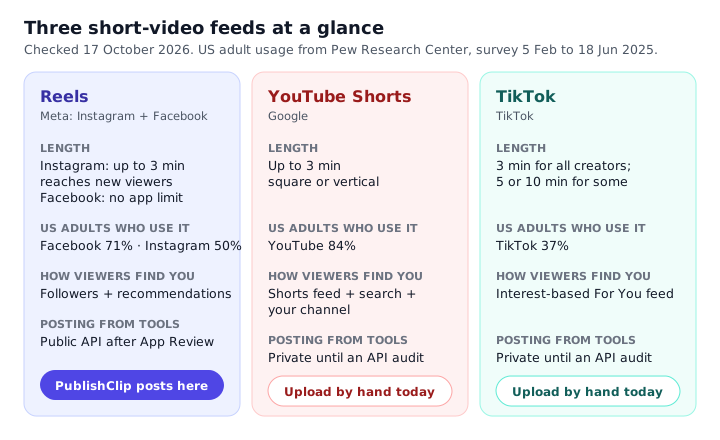
How to read this table
Do not read the usage row as a ranking of which app gets more views. Pew asked people whether they ever use an app. It did not measure how many short videos they watch, or how long. A person who opens YouTube once a month counts the same as one who watches for hours each day.
The posting access row matters more than it looks. It decides whether you can plan a week of clips on Sunday and let a tool post them. Or whether you will open each app and upload by hand at the right time. For a busy owner, that difference often decides which platform gets used at all.
The "best first fit" row is our judgement, not data. We explain the reasons for each kind of business further down, so you can disagree with us on the merits.
What the three have in common
All three accept a vertical MP4 shot at 1080 by 1920 pixels. All three loop the clip and autoplay it with sound off for some viewers, so on-screen captions help everywhere. All three push clips to people who do not follow you yet. And all three now say plainly that they prefer original work over reposted clips. That shared ground is why one well-made clip can serve every feed, as long as you package it for each one. Our guide on how to repurpose video content covers that workflow step by step.
Who is on each platform
The best public source on who uses which app in the US is the Pew Research Center. Its social media fact sheet, published on 20 November 2025, is based on a survey of 5,022 US adults run from 5 February to 18 June 2025. It reports the share of adults who say they ever use each site or app.
| App | Share of US adults who say they ever use it (2025) | |---|---| | YouTube | 84% | | Facebook | 71% | | Instagram | 50% | | TikTok | 37% | | WhatsApp | 32% | | Reddit | 26% | | Snapchat | 25% | | X | 21% | | Threads | 8% |
What these numbers mean for you
Three points stand out.
First, YouTube reaches the most US adults by a wide margin. Shorts live inside the same app, so a Short can reach people who never think of themselves as short-video viewers. Someone searching how to fix a leaking tap may see your Short in the results.
Second, Facebook still reaches seven in ten US adults. It is easy to forget Facebook when people talk about short video. But since June 2025 every video posted to Facebook is shared as a reel, so Facebook is now a large Reels audience in its own right. Add Instagram's 50 percent, and a single Meta clip can reach a big slice of the country.
Third, TikTok's 37 percent is lower than its cultural presence suggests. That does not make it a weak choice. It means TikTok's users skew towards certain groups. Pew's fact sheet breaks each app down by age, and TikTok use is much higher among adults under 30 than among older adults. If your buyers are young, TikTok may matter more than its headline share suggests.
Limits of this data
These are US adults, not teenagers. Pew surveys teens separately, and teen use looks very different. Other countries differ too. If you sell in the UK, India or Brazil, look for a local survey before you decide.
The survey also counts any use. It does not tell you which app your own customers open each day. The cheapest research you can do is to ask them. Put one question on your booking form or receipt: "Which app do you watch short videos on most?" Fifty answers from real customers beat any national survey for your decision.
Length and format limits side by side
Length limits are where most comparison posts go wrong, because each platform has changed its limits several times. Here is what each official page said when we checked on 17 October 2026.
Instagram Reels
Instagram has three different length numbers, and they mean different things.
- Record and edit in the app: Instagram's help page on recording a reel says you can record and edit reels of up to 20 minutes. That page loads its text with scripts, so automated readers see a blank shell. Open it in a browser to read the current wording.
- Shown to people who do not follow you: the same help page says reels over 3 minutes are not recommended to new audiences. Instagram's creators blog post of 21 January 2025 announced that reels up to 3 minutes can be shown to non-followers.
- Posted from outside tools: the Instagram API that scheduling tools use has its own limits. Our guide to Instagram Reels size and specs lists them in full.
The practical rule: keep any reel you want new people to see at 3 minutes or less.
Facebook Reels
Meta's newsroom post of 17 June 2025 said Facebook would remove length and format limits for Reels and share all videos as reels. Facebook's help page on reels playback carries a September 2025 note saying all videos posted to Facebook are now shared as reels, whatever their length or shape.
Tools that post through Meta's Reels publishing API for Pages face a tighter rule: the API accepts reels from 3 to 90 seconds. So a 4-minute video you post in the app is fine, but a scheduling tool cannot send it as a reel. Our guide to Facebook Reels size and specs explains each limit and the errors you see when you break them.
YouTube Shorts
YouTube's help page on uploading Shorts says a Short can be up to 3 minutes long, with a square or vertical aspect ratio. The same page says you can select up to 15 videos at once when uploading Shorts from a phone. It also notes that Shorts from creators aged 13 to 17 are private by default.
A Short that uses music or clips you do not have rights to can get a copyright claim. That can block the Short or send its earnings to the rights holder. The 3-minute limit makes this more likely than it used to be, because longer Shorts often carry longer music beds.
TikTok
TikTok's developer guide to posting content says: "All TikTok creators can post 3-minute videos, while some have access to post 5-minute or 10-minute videos." The same documentation says videos posted through the API can be up to 10 minutes and up to 4 GB, with MP4 and H.264 recommended.
We could only read TikTok's developer pages. Its consumer help pages did not load for us. So treat the 3, 5 or 10 minute rule as TikTok's own description for developers, and check your upload screen to see what your account allows.
Pick one master length
The overlap between all four feeds is clear. A vertical clip of 3 to 90 seconds works everywhere, including through scheduling tools on Facebook. In practice, a master clip of 20 to 60 seconds is the sweet spot. It is long enough to make one clear point and short enough to hold attention to the end. It also stays inside every limit, so you never have to cut a second version for length.
| Feed | Safe length for one master clip | Notes | |---|---|---| | Instagram Reels | 3 to 90 seconds | Up to 3 minutes can still reach new viewers | | Facebook Reels | 3 to 90 seconds | The 90-second cap applies to API posting | | YouTube Shorts | Up to 3 minutes | Vertical or square | | TikTok | Up to 3 minutes | Longer for some accounts |
How each platform finds viewers
Before we compare discovery, a warning. No platform publishes its ranking formula. Posts that tell you exactly what "the algorithm wants" are guessing, or repeating someone else's guess. What the platforms do publish is how their surfaces work and what kinds of content they push down. That is enough to plan with.
Instagram shows your reels to your followers in Feed and the Reels tab. It also recommends reels to people who do not follow you, in Reels, Explore and Feed. Instagram's help page on recommendations explains what makes a post eligible to be recommended to people who do not follow you. Instagram has also said it may not recommend reels that carry another app's watermark.
Its page on original content says Instagram favours original posts in recommendations. If it finds the same reel posted by an account that did not make it, it may show the original instead. For a business posting its own footage, this is good news: your own clips are the kind Instagram says it wants.
Facebook's Reels sit in their own tab and in Feed. Like Instagram, Facebook mixes posts from Pages you follow with recommended reels.
In March 2026 Meta announced a push to reward original creators. It said Facebook would show fewer unoriginal reposts. That includes another person's video with a border, a caption or a speed change added on top. Again, a business filming its own work is on the right side of that line.
YouTube Shorts
YouTube is the only one of the three where search is a main door in. People type questions into YouTube every day. Shorts can show up in those results, in the Shorts feed, on your channel page and next to long videos.
That makes YouTube Shorts a good fit for answers. A Short titled "How to tell if your boiler pressure is too low" can keep earning views for months, because people keep asking that question. A Short that only makes sense today, like a sale ending tonight, gets little from search.
TikTok
TikTok's For You feed is built around interests, not followers. A brand-new account can reach a large audience with one clip, and an account with many followers can see a clip go nowhere. TikTok has said its feed weighs how people interact with a video, but it does not publish the weights.
TikTok also has in-app search, and more people use it to look things up. Keywords in your caption and spoken words in your clip help with that.
What this means for planning
Two kinds of discovery matter here: follower-led and interest-led. Meta mixes both. YouTube adds search on top. TikTok leans hardest on interests. If you already have an audience on Facebook or Instagram, Reels let you use it. If people search for what you do, YouTube Shorts let you catch them. And if you have no audience anywhere yet, TikTok's feed gives a new account a fair shot.
Which platform fits which business
There is no single best short video platform. There is a best fit for your customers, your offer and the time you have. Below are notes for six common kinds of business. They are reasons, not statistics. Use them to sharpen your own guess, then test it.
A local service
Think plumbers, cleaners, salons, dentists, gyms and driving schools. Your customers live within a short drive, and most of them are adults who already use Facebook. Many also use Instagram.
Start with: Facebook and Instagram Reels, then YouTube Shorts.
Why: Facebook reaches the widest range of local adults, including the over-50s who often book services for a household. Facebook Pages also carry your reviews, hours and booking button, so a viewer who likes a clip can act on it in one tap. Instagram adds younger local buyers. YouTube Shorts come next because people search YouTube for "how to" questions about home repairs, hair care and fitness. A clear answer there builds trust before they call.
What to film: before-and-after jobs, quick fixes a customer can do, the three questions every new client asks, and a tour of your van or studio. Keep your face and your town in the clip. Local proof beats polish.
TikTok? Worth a test if your service is visual and your buyers are young, like nail art or tattoos. Less useful for a boiler engineer whose customers are homeowners in their fifties.
A shop
Online shops and high-street stores live on showing the product. Short video is a natural fit.
Start with: Instagram Reels and TikTok, with Facebook Reels posted from the same clip.
Why: Instagram and TikTok both let viewers jump from a clip to a product. Both have shopping features that change by country, so check what your market supports. Products that look good in motion, such as clothing, food, crafts and gadgets, do well on interest-led feeds where a new viewer can discover you. Posting the same clip to Facebook Reels costs you a few minutes and reaches older buyers.
What to film: the product in use, unboxing, how it is made, size and fit checks, and answers to returns questions. Show the price on screen if you can. Viewers who know the price before they click are better buyers.
YouTube Shorts? Good for products that need explaining, like tools, skincare routines or kitchen gear. Less useful for a simple impulse buy.
An expert or consultant
Accountants, lawyers, coaches, consultants, tutors and therapists sell knowledge. Buyers want to trust you before they book.
Start with: YouTube Shorts and Instagram Reels, with LinkedIn video worth a look if you sell to other businesses.
Why: your clips answer questions. YouTube is where people type those questions. A Short that answers "Do I need to file a tax return if I earned under the allowance?" can keep finding viewers for a long time. Instagram Reels let you show the person behind the answer, which helps people feel they know you. A Short can also lead viewers to a longer YouTube video where you go deeper, and that longer video is often what turns a viewer into a client.
What to film: one question per clip, answered in under a minute. A common mistake and how to avoid it. A myth in your field and the truth. Always end with the next step, such as "Book a free call from the link on my profile."
TikTok? It can work very well for experts who enjoy being on camera and can explain things fast. But the audience skews younger, so check whether your buyers are there.
A creator
If the video is the product and you hope to earn from views, brand deals or your own products, your choice is different.
Start with: the platform where your style already fits, then add a second as soon as you can.
Why: creators gain most from interest-led discovery, because they are building an audience from nothing. TikTok and YouTube Shorts both give new accounts a real chance. YouTube also offers a clear route to ad revenue through its Partner Program, covered below. Instagram Reels are strong for creators who sell their own products or work with brands, because brand deals often happen there.
What to film: a repeatable format. A series with a name, a hook in the first second and a pay-off at the end. Formats make it easier to post often, and viewers return for the next one.
A restaurant or café
Food is one of the most-watched topics on every short-video feed. But your buyers are local, like a service business.
Start with: Instagram Reels and Facebook Reels, then TikTok.
Why: Instagram is where many diners look at menus and photos before they choose a place. Facebook reaches older local diners and groups planning events. TikTok has a strong food culture and can bring a rush of new customers if a dish catches on, but those viewers are spread across the whole country. Most of them will never visit.
What to film: the dish being made, the busiest ten seconds of a Friday night, a new menu item, and the people in your kitchen. Put your town or neighbourhood in the caption and on screen.
An event or venue
Wedding venues, festivals, conference organisers and event hire firms sell a date.
Start with: Instagram Reels and Facebook Reels, with YouTube Shorts for search.
Why: your selling window is time-bound, so you want to reach people who already follow you or live nearby, at the right moment. Scheduling matters more here than for anyone else. You want the clip announcing early-bird tickets to go out at 7pm on the day they open, not whenever you remember. Facebook Events and Instagram both give you tools to point viewers to tickets or enquiries.
What to film: last year's highlights, a walk-through of the venue, set-up time lapses, and short clips from guests who agreed to be filmed.
The rule under all six
Start with the platform where your customers already are. A smaller audience of the right people beats a huge audience of the wrong ones. A thousand local views can mean ten new bookings. A hundred thousand views from the other side of the world can mean none.
Posting access: why Meta is easiest for tools today
This section explains something most comparison posts skip. It decides whether you can schedule your clips or must post every one by hand.
Each platform lets outside apps post for you through an API, a connection that apps use instead of the normal upload screen. But each platform guards that connection with its own checks. Those checks differ a lot, and they explain why many tools, ours included, support Meta first.
Meta: App Review and Business Verification
To post Reels for other people, an app must pass Meta's App Review. Meta checks what the app does with each permission it asks for, often with a screen recording of the app in use. For wider access, Meta also asks the business behind the app to pass Business Verification. Meta's Instagram Platform overview describes this as Standard Access and Advanced Access.
Once an app passes, it can publish reels to Facebook Pages and Instagram professional accounts in public, at the time you choose. That is why you can schedule Reels from Meta's own Business Suite and from third-party tools today. Our guide on how to schedule Instagram Reels compares those options.
There are still limits. Instagram accounts can publish a set number of posts through the API in each 24-hour window, and Facebook Reels sent through the API must be 3 to 90 seconds. But the door is open.
YouTube: a daily upload bucket and an audit
Google's quota page for the YouTube Data API, last updated on 15 October 2026, lists uploads through videos.insert in their own bucket. By default each app project gets 100 upload calls a day in that bucket, on top of 10,000 units a day for other calls. An app that posts for many users can run through 100 uploads a day very quickly, and it must apply to Google for more.
The bigger hurdle is the audit. Google's revision history for the YouTube Data API has an entry dated 28 July 2020. It says videos uploaded through videos.insert by unverified API projects created after that date are restricted to private viewing until the project passes a compliance audit. Private means only the uploader can see the video.
Google's reference page for videos.insert has been reported to word this differently. When two official pages seem to disagree, plan for the stricter one. In practice, a new tool that uploads Shorts for you will see them land as private until Google approves the tool.
TikTok: an audit and private mode
TikTok's Content Posting API guide is blunt: "All content posted by unaudited clients will be restricted to private viewing mode." To post in public for its users, an app must pass TikTok's audit. Direct posting also needs a specific permission, called video.publish.
TikTok's rules also ask apps to show the creator certain choices before each post, such as who can view it and whether it is promotional content. That is good for creators, but it means a tool cannot simply fire off a clip in the background the way it can with some other feeds.
Why this matters to you
Put together, these gates explain a pattern you will see across scheduling tools. Meta support is common and mature. YouTube and TikTok support is rarer, sometimes limited, and depends on each tool passing its audit.
For PublishClip, the honest picture as of 17 October 2026 is this:
- Facebook Reels and Instagram Reels: live, free, and scheduled at the time you pick.
- YouTube Shorts and TikTok: the posting code is written and tested, but switched off until each platform's review clears. We do not promise a date, because the date is not ours to set.
Until then, the simple workflow is to schedule your Meta posts and upload Shorts and TikToks by hand in one sitting. YouTube Studio lets you schedule a Short when you upload it. TikTok lets you schedule posts on its website. Neither takes long once you have your clips ready.
Rules when the same video goes to all three
Yes, you can post the same clip to Reels, Shorts and TikTok. All three allow it. But each has rules that can quietly cut your reach if you ignore them. Here are the ones that matter, checked on 17 October 2026.
Originality
All three platforms now say they prefer original content. Read the detail, though, and the line is clear. They target people who repost other creators' work without real changes. Your own footage, posted to your own accounts, is original on every platform.
- Facebook: Meta's March 2026 announcement says Facebook will show fewer unoriginal reposts. It names small edits, such as adding a border, a caption or a speed change to someone else's video, as not enough to make it original.
- Instagram: the help page About original content says Instagram favours the original creator in recommendations.
- YouTube: YouTube's channel monetisation policies cover "inauthentic content" and "reused content". On 15 July 2025 YouTube renamed its "repetitious content" policy to "inauthentic content". It said its reused content policy did not change. These rules decide whether a channel can earn money. They do not stop you from posting your own clips more than once.
Watermarks from other apps
When you save a video from TikTok, the file carries a moving TikTok logo and an end card. Do not upload that file to Reels or Shorts. Instagram has said it may not recommend reels that carry another app's watermark. Even where no rule applies, a rival's logo tells viewers the clip was made for somewhere else.
The fix is simple. Export one clean master file from your editor, before any app adds its logo. Upload that clean file to each platform.
Labels for AI and for paid promotion
All three platforms ask you to label some content.
- AI: each platform asks creators to disclose realistic content made or changed with AI, and each has a label for it. If you use AI to change a person's face or voice, or to show an event that did not happen, label it on every platform.
- Paid promotion: if a brand paid you or gave you free products, each platform has a paid-partnership or branded-content setting. Turn it on every time. Local advertising laws apply too.
Music
Music rights differ by platform and by account type. Business accounts often have a smaller music library than personal or creator accounts, because businesses use music in ads. A song that is fine on your personal TikTok may be muted or blocked on your business Instagram.
The safe option is to use music you own a licence for, or each platform's own business-safe library, added inside each app. Or use no music at all and let a clear voice carry the clip.
Captions
Write a separate caption for each platform. The clip can be the same; the words around it should not be.
- Instagram: a short first line that makes people tap "more", then detail and a call to action. Instagram now limits posts to five hashtags.
- Facebook: a warmer, chattier tone often fits. A question works well.
- YouTube Shorts: a clear title that matches what people would search for. The title matters more than the description.
- TikTok: short captions with keywords people might search for in the app.
On-screen captions are just as important. Many people watch with the sound off. Our guide on how to add captions to Reels covers automatic, manual and burned-in captions.
Safe zones
Each app puts buttons, captions and your account name over the bottom and right of the clip. Keep your key text and faces in the middle of the frame, away from the edges. The exact pixel areas differ a little by app, so the specs guides for Instagram and Facebook are worth a look before you add text.
Timing
Do not post the same clip to all feeds at the same minute. Stagger them by a day or two. You get a second chance to learn which hook works, and followers who use more than one app do not see the same clip three times in an hour. Our guide on how to cross-post Reels to Facebook and Instagram explains when to share one reel to both and when to post them apart.
Money: what each platform pays
Each platform runs programmes that pay some creators for views. The rules change often, and most small businesses will never meet them. So this section is short on purpose.
YouTube
YouTube's Partner Program page, read on 17 October 2026, lists two routes to apply for a share of ad revenue:
- 1,000 subscribers and 4,000 public watch hours on long videos in the last 12 months, or
- 1,000 subscribers and 10 million public Shorts views in the last 90 days.
The same page says YouTube will bring in updates to the Partner Program from 1 February 2027, and that creators should accept the updated terms in YouTube Studio by 31 January 2027. Trade press in August 2026 reported higher thresholds for new applicants under those updates. YouTube's page did not list those new numbers when we checked, so we do not print them here as fact. Check YouTube's own page before you plan around them.
Meta and TikTok
Meta and TikTok both run creator payment programmes. Their names, rules and countries change often, and some are invite-only. Look them up in each app's creator or professional dashboard rather than trusting a blog post, including this one.
Why most small businesses should not plan on it
Ten million Shorts views in 90 days is a very high bar. Even creators who meet it often find that ad revenue from Shorts is small per view. For a business, a single booked job, table or sale is usually worth more than thousands of paid views.
Measure what pays your bills instead:
- Profile visits and link clicks.
- Messages and calls that mention a video.
- Bookings, orders and enquiries in the week after a clip goes out.
- How many new customers say "I saw your video".
If a clip brings you three good leads, it worked, whatever its view count.
A simple plan: start with two
Trying to post daily on three or four feeds from day one is how most small businesses burn out. A better plan is to pick two, post well for 90 days, then decide whether to add a third.
Step 1: score each platform
Use the worksheet below. Score each question 0 for no, 1 for partly and 2 for yes. Add each column. Start with the two highest totals. If two scores tie, pick the one you will actually enjoy using.
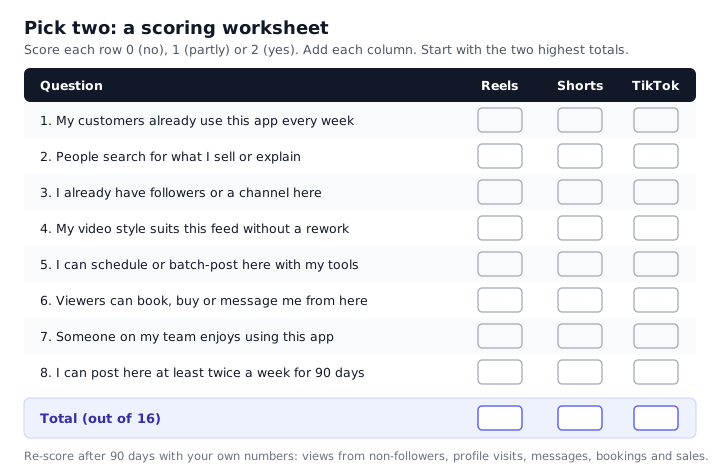
| Question | Reels | Shorts | TikTok | |---|---|---|---| | 1. My customers already use this app every week | | | | | 2. People search for what I sell or explain | | | | | 3. I already have followers or a channel here | | | | | 4. My video style suits this feed without a rework | | | | | 5. I can schedule or batch-post here with my tools | | | | | 6. Viewers can book, buy or message me from here | | | | | 7. Someone on my team enjoys using this app | | | | | 8. I can post here at least twice a week for 90 days | | | | | Total (out of 16) | | | |
Question 7 looks soft, but it matters. The platform someone on your team likes is the platform that gets posted to in a busy month. The others get forgotten.
Step 2: run a 90-day test
For 90 days, post two to three clips a week on each of your two picks. Use one master clip for both, with captions written for each feed. Batch the work: film once a week, edit once a week, and schedule what you can. Our guide on how to repurpose video content lays out a three-hour weekly routine for exactly this.
Keep the test fair:
- Post at a steady rhythm. Do not post ten clips one week and none the next.
- Try different hooks, not just different topics. The first second decides whether people stay.
- Do not judge a platform on its first two weeks. New accounts often start slow.
Step 3: measure what matters
Once a week, write down five numbers for each platform in a simple sheet:
| Measure | Why it matters | |---|---| | Views from non-followers | Shows whether the feed is finding you new people | | Average watch time | Shows whether your clips hold attention | | Profile visits or link clicks | Shows interest beyond the clip | | Messages, calls or enquiries | Shows buying intent | | Bookings or sales you can trace to video | The number that pays the bills |
Each app shows the first three in its own insights screen. The last two you track yourself. A simple "How did you hear about us?" question at booking or checkout is enough.
Step 4: decide what comes next
At day 90, look at the trend, not the best week. You will usually see one of three patterns.
- Both platforms bring leads. Keep both. Consider adding the third, but only if you can keep the same rhythm on all three.
- One platform clearly beats the other. Put more effort into the winner. Keep the weaker one ticking over with reposts of your best clips, or swap it for the third platform and run a new 90-day test.
- Neither brings leads. Look at the clips before you blame the platforms. Check your hooks, your captions and your calls to action. Ask five customers to watch three clips and tell you what they would change.
When to add a third platform
Add a third when your two-platform routine takes less time than when you started, and you have a stock of clips that worked. By then you know your formats and your hooks. A new feed is mostly packaging work, not new filming.
Myths worth dropping
A few beliefs about short video keep coming up. Here is what the official sources say about them.
"You must post every day." No platform says this. A steady rhythm you can keep beats a burst you cannot. Two or three good clips a week, every week, is a solid plan for most small businesses.
"Cross-posting gets you punished." The originality rules target reposts of other people's work. Posting your own clip to your own accounts is not unoriginal. What can hurt is uploading a file with another app's watermark.
"The algorithm hates links." Platforms do not publish ranking weights, so nobody outside them can prove this either way. Put a clear next step in your caption and on your profile, and measure whether people act on it.
"Vertical is all that matters." Shape is the start, not the finish. The hook, the clarity of the message, captions for viewers with the sound off, and keeping text out of the safe zones matter just as much.
"You need expensive gear." A recent phone, a cheap clip-on microphone and daylight from a window are enough. Clear sound matters more than a sharp picture.
"Shorts are only for young people." Pew's 2025 data shows YouTube is used by 84 percent of US adults. Shorts live in the same app, so they reach every age group YouTube reaches.
"A viral clip will fix your business." One clip with a million views from the wrong people brings few customers. A steady stream of clips that the right people see, week after week, is what builds a business.
Key takeaways
- Choose by your customers, not by hype. Ask them which app they watch short videos on.
- A vertical master clip of 20 to 60 seconds fits every feed, including through scheduling tools.
- Meta's Reels are the easiest to schedule from outside tools today. YouTube and TikTok keep uploads from unaudited apps private.
- Post your own clean files, without other apps' logos, and write separate captions for each feed.
- Start with two platforms, run a fair 90-day test, and measure leads and sales, not just views.
Frequently asked questions
Is it better to post Reels, Shorts or TikTok?
None of the three is better for everyone. The right choice is the feed your customers already open every week. For most US small businesses that means Facebook and Instagram Reels first, because Facebook reaches 71 percent and Instagram 50 percent of US adults in Pew's 2025 survey. YouTube Shorts make a strong second when people search for what you sell or explain. TikTok earns a place when your buyers are younger or your product shows well in a fast clip. Score all three with the worksheet above and start with your top two.
Can I post the same video to Reels, Shorts and TikTok?
Yes. All three platforms allow you to post your own clip in more than one place. Their originality rules target reposts of other people's work, not your own footage. Upload a clean master file without another app's watermark, keep the clip vertical and under 90 seconds so it fits every feed and scheduling tool, and write a separate caption for each platform. Staggering the posts by a day or two also helps, because followers who use more than one app will not see the same clip three times in one hour.
Which gets more views, Reels or TikTok?
No platform publishes a reliable public comparison of views per clip, and outside studies use different samples and methods, so treat any claim that one always gets more views with caution. What is public is usage. Pew's 2025 survey found 50 percent of US adults use Instagram, 71 percent use Facebook and 37 percent use TikTok. Views for your account depend on your audience, your hooks and how often you post. The only way to know for your business is to post the same clips to both for 90 days and compare.
Do I need to remove the TikTok watermark before posting to Reels?
You should not post a file that carries the TikTok watermark to Reels at all. Instagram has said it may not recommend reels with another app's watermark, and the logo tells viewers the clip was made for somewhere else. Trying to blur or crop out the logo usually looks worse. Instead, export one clean master file from your editing app before you upload it anywhere. Then upload that same clean file to TikTok, Instagram, Facebook and YouTube, so each platform adds only its own branding when it plays the clip.
Which platform is best for a small business?
For most local and small businesses in the US, Facebook and Instagram Reels are the best place to start. Facebook reaches more US adults than any app except YouTube, and Pages carry your reviews, hours and booking options next to your clips. Reels are also the easiest short videos to schedule from outside tools today. Add YouTube Shorts if customers search for answers you can give. Add TikTok if your buyers are younger or your product looks great in motion. Then measure leads, not views, to see what works.
Does PublishClip post to YouTube Shorts and TikTok?
Not yet. As of 17 October 2026, PublishClip schedules and publishes Facebook Reels and Instagram Reels, free. Support for YouTube Shorts and TikTok is written and tested in our code, but it is switched off until each platform finishes reviewing our app. Both platforms keep uploads from unaudited apps private, so turning it on early would only post private videos. We do not promise a date, because the review timing belongs to Google and TikTok. Until then, upload Shorts and TikToks by hand while PublishClip handles your Reels.
How long can a YouTube Short be?
YouTube's help page on uploading Shorts, checked on 17 October 2026, says a Short can be up to 3 minutes long, with a square or vertical aspect ratio. Remember that longer Shorts are more likely to include music or clips you do not have rights to, which can bring a copyright claim. For a clip you also plan to post to Reels and TikTok, a length of 20 to 60 seconds fits every platform and every scheduling tool.
Sources and how this was checked
We read every page below on 16 and 17 October 2026. Where a page could not be read by automated tools, we say so. Numbers in this guide come only from these pages.
Audience
- Pew Research Center: Social media fact sheet, published 20 November 2025, survey of 5,022 US adults from 5 February to 18 June 2025.
Length and format
- YouTube Help: Upload YouTube Shorts
- Instagram Help: Record a reel on Instagram (the text loads with scripts; open it in a browser)
- Instagram for Creators: Finding success on reels in 2025, 21 January 2025
- Meta newsroom: Making it easier to create videos on Facebook, 17 June 2025
- Facebook Help: Unable to view or play reels, with its September 2025 update note
- Meta for Developers: Reels publishing API for Pages
- TikTok for Developers: Content Posting API media transfer guide
Discovery and originality
- Meta newsroom: Rewarding original creators on Facebook, March 2026
- Instagram Help: About original content on Instagram
- Instagram Help: Recommendations on Instagram
- YouTube Help: Channel monetisation policies
Posting access
- Meta for Developers: Instagram Platform overview
- Google for Developers: YouTube Data API quota costs, last updated 15 October 2026
- Google for Developers: YouTube Data API revision history
- TikTok for Developers: Content Posting API, get started
Money
What we could not confirm
- Instagram's exact length wording. Instagram's help pages load their text with scripts. We confirmed the 3-minute recommendation limit from Instagram's creators blog. Check the help page in a browser for the current 20-minute wording.
- TikTok's in-app length limits. We could read TikTok's developer pages but not its consumer help pages. The 3, 5 or 10 minute rule is TikTok's description for developers. Check your own upload screen.
- YouTube's private-upload rule. Google's revision history says uploads from unverified API projects stay private until an audit. The
videos.insertreference page has been reported to word this differently. We follow the stricter reading. - YouTube's 2027 thresholds. Trade press has reported new Partner Program numbers. YouTube's own page did not list them when we checked, so we left them out.
About this guide
This guide was written by the team behind PublishClip. Our product posts to Facebook Reels and Instagram Reels only, and we have tried to be fair to the platforms we do not yet support. We review this guide every three months, because platform rules and limits move quickly. If you spot something out of date, let us know.