Facebook Reels Size, Length and Format: 2026 Specs
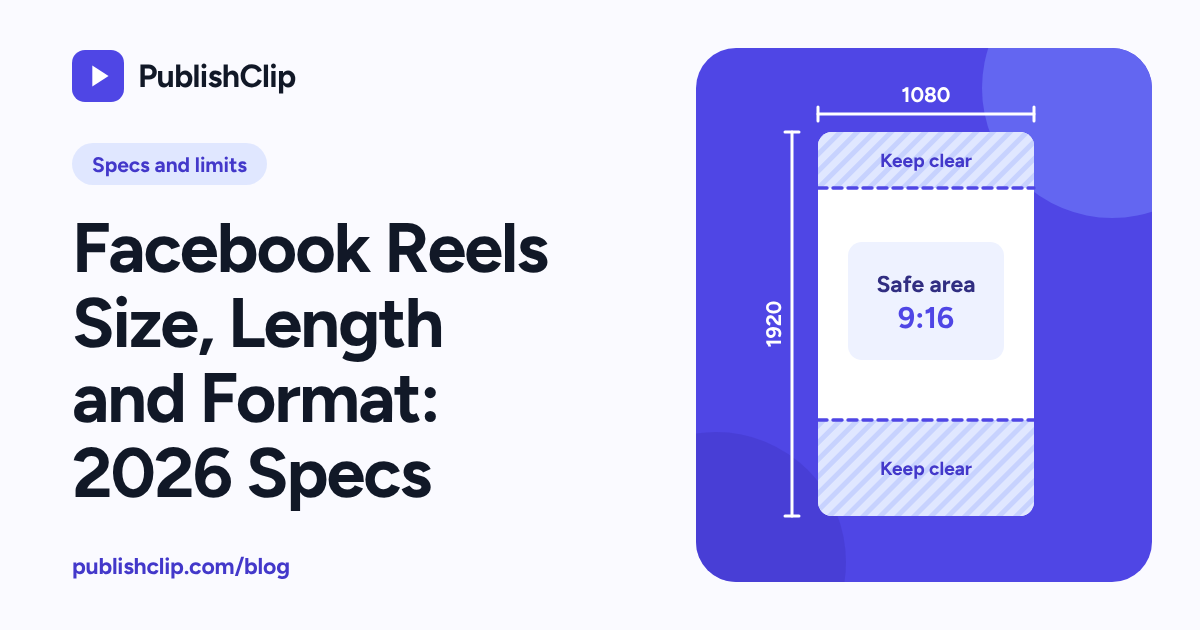
The recommended Facebook Reels size is 1080 by 1920 pixels at a 9:16 vertical aspect ratio, saved as an MP4 file with H.264 video, AAC-LC stereo audio and a fixed frame rate of 30 frames per second. If you post directly inside the Facebook app or on Facebook's website, Meta announced on 17 June 2025 that Facebook videos no longer have length or format restrictions and are all shared as Reels. If you publish or schedule through a third-party tool that uses Meta's Reels Publishing API for Pages, a strict technical rulebook still applies: your video must be 3 to 90 seconds long, at least 540 by 960 pixels, and between 24 and 60 frames per second.
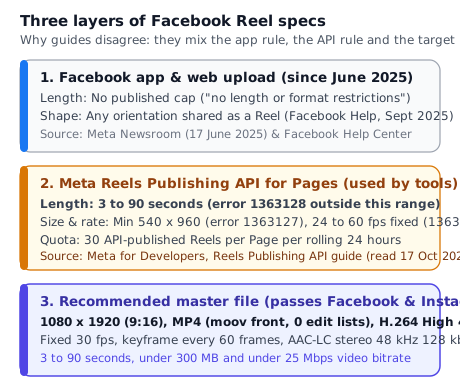
That split between the Facebook app and Meta's API is the reason almost every spec guide on the web disagrees with the next one. One page tells you Facebook Reels stop at 60 or 90 seconds. Another says any video up to several hours works. A third quotes a 1 GB or 4 GB file-size cap without naming a source. Every one of those articles is mixing up three different layers: what the Facebook app accepts from a camera roll, what Meta's API requires from a scheduling tool, and what export settings give you a sharp vertical video on a phone screen.
Last checked: 17 October 2026. We read Meta's developer documentation, newsroom announcements and help pages on that date, and tested the export commands with FFmpeg 6.1.1 on 16 and 17 October 2026.
On this page
- Facebook Reels size and format at a glance
- What changed in 2025: all Facebook videos are Reels
- Facebook Reels size and aspect ratio
- Facebook Reels length: app limit versus API limit
- File format, codecs, frame rate and audio
- Safe zones: where the app's buttons cover your video
- Captions, titles and hashtags on Facebook Reels
- How tools publish a Facebook Reel: start, upload, finish
- Limits that apply when a tool posts your Reel
- Thumbnails and covers on Facebook Reels
- Spec error codes you may see
- A Facebook Reels export checklist
- Key takeaways
- Frequently asked questions
- Sources and how this was checked
Facebook Reels size and format at a glance
Facebook Reels are 9:16 vertical videos at 1080 by 1920 pixels in an MP4 container with H.264 video and AAC audio. The Facebook app now accepts any length or orientation and shares it as a Reel, while Meta's Reels Publishing API for Pages requires 3 to 90 seconds, a fixed 24 to 60 frames per second, and at least 540 by 960 pixels.
The spec card below separates our recommended master settings from the hard limits enforced by Meta's API and the rules inside the Facebook app, with the primary source for every row.
| Setting | Recommended master | Hard limit (app vs API) | Primary source (as of 17 Oct 2026) |
|---|---|---|---|
| Aspect ratio | 9:16 vertical | App: any orientation. API: guide lists 9:16; error 1363040 says 16:9 to 9:16. | Facebook Help (Sept 2025 note); Reels Publishing API guide |
| Resolution (Facebook Reels size) | 1080 x 1920 pixels | API minimum: 540 x 960 pixels (1080 x 1920 recommended). App: none stated. | Reels Publishing API guide (error 1363127) |
| Length (duration) | 15 to 90 seconds for cross-posting | App: no length restriction. API: 3 to 90 seconds. | Meta Newsroom (17 June 2025); Reels Publishing API guide (error 1363128) |
| Frame rate | 30 fps fixed (constant) | API: 24 to 60 fps, fixed frame rate. | Reels Publishing API guide (error 1363129) |
| Container | .mp4 (moov atom at front, zero edit lists) | API: .mp4 recommended. Instagram API adds no edit lists and moov at front. | Reels Publishing API guide; IG User Media reference |
| Video codec | H.264 High profile, progressive, closed GOP | API: H.264 or H.265 (VP9 and AV1 also supported), progressive, closed GOP 2 to 5 s. | Reels Publishing API guide |
| Chroma and bit depth | 4:2:0 (yuv420p), 8-bit | API: 4:2:0 chroma subsampling. | Reels Publishing API guide |
| Audio codec | AAC-LC stereo, 48 kHz, 128 kbps | API: AAC-LC, 128 kbps or more, 2 channels (stereo), 48 kHz sample rate. | Reels Publishing API guide |
| File size and bitrate | Under 300 MB and under 25 Mbps video | Facebook API: not stated. Instagram API: 300 MB and 25 Mbps VBR max. | Reels Publishing API guide; IG User Media reference |
| Daily API publishing limit | Space posts across the week | API: 30 API-published Reels per Page per rolling 24 hours. | Reels Publishing API guide |
Why one master file saves hours
Most creators and businesses do not make one video only for Facebook. They post the same clip to Instagram Reels as well, and often schedule both through a single tool. If you export your video to the "Recommended master" column in the table above, that single MP4 file satisfies both the Facebook Reels API and the Instagram Reels size and specs rules on the first try.
What changed in 2025: all Facebook videos are Reels
For years, Facebook had two separate ways to post a pre-recorded video. You could upload a short vertical clip as a Reel, or you could upload a regular Facebook video with a longer runtime or a horizontal frame. Each format had its own composer, its own tab on a Page or profile, and its own length cap.
On 17 June 2025 (updated 14 July 2025), Meta published a newsroom announcement titled "Making It Easier to Create Videos on Facebook". In that post, Meta announced that in the coming months "all videos on Facebook will be shared as reels, eliminating the need to choose between uploading a video or reel." In the same announcement, Meta wrote: "Reels on Facebook will also not have any length or format restrictions". Meta also stated that the Video tab on profiles and Pages was being renamed the Reels tab, and that the change would roll out gradually across the world to both profiles and Pages.
A September 2025 update note on Facebook Help article 396404120401278 repeats that rule in plain words: "All videos posted to Facebook will be shared as reels", and adds that this applies "regardless of length or orientation".
Why older guides still quote 15, 30, 60 or 90 seconds
When Facebook first launched Reels, the in-app limit was 15 seconds, then 30, then 60, and later 90 seconds. Because thousands of marketing blogs copied those numbers without dates, search results in 2026 still repeat 60 seconds or 90 seconds as if it were the rule inside the Facebook app today.
Those numbers are history for direct uploads in the app, with two important qualifications:
- Gradual rollout. Meta explicitly called the June 2025 change a gradual rollout to profiles and Pages. If a specific account or older app build still shows a 90-second trim bar in the mobile composer, that is a rollout gap rather than the documented platform policy. Updating the Facebook app is the first step to check.
- The API did not change. While the Facebook app dropped its length and format restrictions, Meta's Reels Publishing API for Pages — read on 17 October 2026 with Graph API v25.0 examples — still enforces a 3 to 90 second duration rule and a 9:16 vertical format.
What the unified Reels format means for Pages
For Page owners, the June 2025 unification changes how you plan your library. Previously, a three-minute product tutorial or a ten-minute webinar excerpt lived in a separate Video tab, while short vertical clips lived in the Reels tab. Now, every video uploaded to Facebook lands in the same Reels surface and uses the same unified composer.
That does not mean a horizontal webinar recording suddenly looks good on a phone screen. When people scroll the Reels feed on mobile, the player is a full-screen 9:16 vertical viewport. A video that fills that viewport uses every pixel of the viewer's screen. A landscape video leaves most of the screen empty above and below the picture.
Facebook Reels size and aspect ratio
The standard Facebook Reels size is 1080 pixels wide by 1920 pixels tall, which is a 9:16 aspect ratio. Every 9 pixels of width match 16 pixels of height (1080 / 1920 = 0.5625, and 9 / 16 = 0.5625).
Recommended resolution versus the API minimum
In the Video Specifications table of Meta's Reels Publishing API guide, Meta states two numbers for resolution and aspect ratio:
- Aspect ratio:
9:16. - Resolution:
1080x1920recommended, with540x960as the minimum.
Notice that 540x960 is exactly half the width and half the height of 1080x1920 (one quarter of the total pixels). If a video sent through the Reels API drops below 540 pixels wide or 960 pixels tall, the API rejects the upload with error code 1363127 ("The video file you selected is in a resolution that we don't support").
Why error code 1363040 mentions 16:9 to 9:16
Meta's documentation contains an instructive detail in its error table. At the top of the Reels Publishing API guide, the specification table says 9:16. Further down the same page, the error code table lists error 1363040 with the message: "Your video's aspect ratio isn't supported. Please upload a video with aspect ratio between 16x9 and 9x16."
What does that discrepancy tell you? Inside the API's validator, the aspect ratio check rejects ultra-wide cinema videos (wider than 16:9) and ultra-tall strips (narrower than 9:16), while the specification table names 9:16 as the target format. Even if the validator lets a 16:9 or 1:1 file slip past error 1363040, a non-vertical video will not fill the 9:16 Reels player on a phone, and a 1920x1080 horizontal clip can still trip resolution or framing checks depending on how the endpoint measures width and height. Always export at 9:16 (1080x1920) before sending a Reel to any publishing tool.
Why 1080x1920 beats 720p and 4K for Reels
You might wonder whether exporting at 4K vertical (2160x3840) makes your Facebook Reel look twice as sharp, or whether 720x1280 is "good enough" to save upload time.
- Why 720x1280 looks soft. Modern phones have high-density screens that are at least 1080 physical pixels wide. When you upload a
720x1280video, the phone has to upscale your video by 1.5 times in each dimension (1080 / 720 = 1.5) to fill the screen. Fine edges, burned-in captions and skin textures blur during that upscale, and Facebook's own re-encoding adds a second layer of compression artifacts on top. - Why 2160x3840 (4K) is wasted on the API. Meta's Reels API recommends
1080x1920, and Instagram's IG User Media specification explicitly sets a maximum horizontal width of1920pixels. If you export a 4K vertical file (2160pixels wide), you quadruple the pixel count, inflate the file size, and force Meta's servers (or your scheduling tool) to downscale the video anyway. Filming in 4K is a huge advantage when you edit and crop, because it gives you extra pixels to zoom in without losing sharpness, but your final delivery file should be downscaled cleanly in your editor or with FFmpeg to1080x1920. - Square pixels (SAR 1:1). Make sure your export uses square pixels (
Sample Aspect Ratio 1:1), so the stored pixel dimensions (1080x1920) and the display aspect ratio (9:16) match without relying on container metadata that some players ignore.
What happens when you upload horizontal or square video
As noted in Facebook's September 2025 help update, the Facebook app shares any video you upload as a Reel regardless of orientation. We did not test how the current mobile app renders non-9:16 uploads across every device build on 17 October 2026, so we do not claim whether a given screen crops or pads a horizontal upload in the feed preview. What never changes is the geometry of a phone: a 16:9 horizontal video fitted inside a 9:16 vertical player is only 608 pixels tall on a 1080-wide screen, leaving more than two thirds of the vertical screen empty.
If your source footage is 16:9 — such as a camera interview, a YouTube video, a podcast recording or a screen capture — convert it to 9:16 before you upload. Our step-by-step guide to converting horizontal video to vertical (9:16) covers the five ways to do that (centre crop, reframing to follow the speaker, blurred background fill, solid bars and stacked two-shot layouts) with the exact crop math and tested FFmpeg commands.
Facebook Reels length: app limit versus API limit
How long can a Facebook Reel be in 2026? The answer depends entirely on how the video gets onto Facebook.
1. Posting inside the Facebook app or on Facebook's website
In its 17 June 2025 announcement, Meta stated: "Reels on Facebook will also not have any length or format restrictions". And Facebook Help article 396404120401278 confirms that all videos posted to Facebook are shared as Reels "regardless of length or orientation".
Meta does not state a new maximum runtime on either of those pages, so do not trust third-party spec tables that invent a 15-minute, 60-minute or 240-minute "Facebook Reels limit" without citing a current Meta page. For direct uploads in the app, Meta's own published rule is that there is no length restriction.
2. Publishing or scheduling through Meta's Reels API (and third-party tools)
When a scheduling tool, a social media dashboard or your own custom script publishes a Reel to a Facebook Page, it uses Meta's Reels Publishing API for Pages. As of 17 October 2026, the Video Specifications table in that guide lists:
- Length:
3 seconds to 90 seconds.
If a tool submits a video shorter than 3 seconds or longer than 90 seconds to the /video_reels endpoint, Meta's server returns error code 1363128 ("The video file you selected is in a duration that we don't support. Please try again with a video file in a duration between 3 seconds and 90 seconds.").
How that compares with Instagram Reels
Instagram has its own split between app limits and API limits, and the numbers are different from Facebook's. On Instagram, the IG User Media API reference allows Reels from 3 seconds to 15 minutes through the API, while Instagram's in-app Reels editor expanded to 3 minutes for recommendations in January 2025 and up to 20 minutes in the camera in late 2025 (see our Instagram Reels size and specs guide for the dated sources).
Because Facebook's Reels API stops at 90 seconds while Instagram's Reels API goes up to 15 minutes, 90 seconds is the shared ceiling whenever you cross-post a Reel to Facebook and Instagram through an API-based tool. That is why PublishClip enforces a 3 to 90 second duration rule on uploads: a clip inside that window is guaranteed to meet the length rule on both Facebook and Instagram.
Choosing the right length for your Facebook Reel
Many blogs claim that the "optimal" Facebook Reel length is 7 to 15 seconds, or 21 to 34 seconds. Meta has published no rule like that on the pages we read. What Meta has published, in its March 2026 newsroom post on rewarding original creators on Facebook, is that original content filmed or produced directly by a creator is favoured, and that views and watch time for original Reels roughly doubled in the second half of 2025 compared with the same period in 2024. Make the video as long as the story or tutorial needs, cut dead air at the start, and keep it between 3 and 90 seconds if a tool will publish it.
File format, codecs, frame rate and audio
When a video upload fails in a scheduler or looks washed out after Facebook processes it, the cause is almost always inside the container, the video stream or the audio stream rather than the pixel dimensions. Here is every item from Meta's Reels Publishing API specification table, as read on 17 October 2026, paired with what each term means in practice.
| Parameter | Meta Reels Publishing API specification | Practical export choice |
|---|---|---|
| Container format | .mp4 recommended | .mp4 with moov atom at the front and zero edit lists |
| Video codec | H.264, H.265 (VP9 and AV1 are also supported) | H.264 (libx264), High profile |
| Scan type | Progressive scan | Progressive (never interlaced) |
| Chroma subsampling | 4:2:0 | yuv420p (8-bit) |
| Closed GOP | 2 to 5 seconds | Keyframe every 60 frames (~2 seconds at 30 fps), closed GOP |
| Frame rate | 24 to 60 fps (fixed frame rate) | 30 fps constant frame rate |
| Audio codec | AAC Low Complexity (AAC-LC) | AAC-LC (aac) |
| Audio bitrate | 128 kbps or more | 128 kbps or 192 kbps |
| Audio channels | 2 (stereo) | 2 channels (`-ac 2`) |
| Audio sample rate | 48 kHz | 48,000 Hz (`-ar 48000`) |
| Maximum file size | Not stated in the Facebook Reels API guide | Keep under 300 MB (Instagram's API cap) |
Why H.264 High profile and 8-bit 4:2:0 are the safest pair
Meta's table lists H.264 and H.265 (HEVC), and notes in parentheses that VP9 and AV1 are also supported. Why do we still recommend 8-bit H.264 (yuv420p) for every master file?
- Universal hardware and browser support. Every phone, desktop browser and cloud transcoder decodes H.264 High profile without extra licensing or codec plugins.
- The 10-bit trap. Recent iPhones (in ProRes or HDR/Dolby Vision modes) and mirrorless cameras often record 10-bit 4:2:2 or 10-bit 4:2:0 video. In our FFmpeg 6.1.1 tests on 16 and 17 October 2026, encoding a 10-bit source with
libx264without specifying-pix_fmt yuv420pkept the output as High 10 profile (yuv420p10le). Passing-pix_fmt yuv420pforced a clean 8-bit 4:2:0 output. Meta's specification asks for 4:2:0 and says nothing about 10-bit, so converting to 8-bityuv420pis a sensible precaution that avoids colour shifts or decoder errors.
Fixed frame rate (24 to 60 fps) versus variable frame rate (VFR)
Meta's specification states 24fps to 60fps (fixed frame rate), and error code 1363129 rejects videos outside that range.
The phrase fixed frame rate (also called constant frame rate, or CFR) is critical. Smartphone cameras and screen-recording tools frequently record in variable frame rate (VFR): when the scene is still, the phone drops from 30 fps to 15 or 19 fps to save storage, then jumps back to 30 fps when motion starts. A VFR file can report an average frame rate near 29 or 30 fps while containing individual frame intervals that confuse API validators or cause audio-to-video drift after re-encoding. Passing -r 30 in FFmpeg (or choosing "Constant Frame Rate" in HandBrake or your editor) converts the timeline to a fixed 30 frames per second.
Closed GOP of 2 to 5 seconds
A Group of Pictures (GOP) is the distance between full reference frames (keyframes, or I-frames). Meta's Facebook Reels API asks for a closed GOP of 2 to 5 seconds. In a closed GOP, frames inside one group never reference frames from an earlier group, which lets Meta's servers split and transcode the video cleanly in parallel chunks.
At a fixed 30 frames per second, 2 seconds equals 60 frames. In libx264, closed GOP is already the default (open_gop=0). Setting -g 60 -sc_threshold 0 places an I-frame every 60 frames (about 2 seconds), right at the bottom edge of Meta's 2-to-5-second window.
Audio: why stereo 48 kHz AAC-LC matters
Look closely at the audio rows in Meta's Facebook Reels API table:
- Codec: AAC Low Complexity (
AAC-LC). - Bitrate:
128 kbpsor more. - Channels:
2 (stereo). - Sample rate:
48 kHz(48000 Hz).
Notice two differences from Instagram's table. First, Instagram's IG User Media reference says "mono or stereo" and "up to 48kHz", whereas Facebook's Reels API table explicitly specifies 2 (stereo) and 48kHz. Second, many voice microphones and older audio presets export mono audio at 44.1 kHz (44100 Hz). If you export stereo (-ac 2) at 48000 Hz (-ar 48000) and 128k (-b:a 128k), your audio track satisfies both Facebook's stricter specification and Instagram's specification at the same time.
Container layout: faststart (moov at the front) and zero edit lists
Meta's Facebook Reels API guide recommends .mp4, and Meta's Instagram Reels API specification adds two structural requirements for MP4 containers: no edit lists and the moov atom at the front of the file.
What do those two phrases mean inside an MP4 file?
- The
moovatom (index) at the front. An MP4 file stores its raw audio and video samples inside anmdat(media data) box and its index of timestamps and tracks inside amoov(movie) box. By default, FFmpeg writes themoovbox at the very end of the file after encoding finishes (ftyp,free,mdat,moov). When Meta's servers fetch a hosted video over HTTP, an index at the front (ftyp,moov,free,mdat) lets the server inspect the video's duration, resolution and tracks immediately without downloading the entire file first. Adding-movflags +faststartmoves themoovbox to the front. - Zero edit lists (
edts/elst). By default, FFmpeg writes an edit list (edtscontaining anelstbox) into each track of an MP4 file to record track offsets and B-frame reordering delays. Even with-movflags +faststart, those twoedtsboxes remain in a default encode. Adding-use_editlist 0tells the MP4 muxer not to writeedtsboxes.
When we tested -use_editlist 0 with FFmpeg 6.1.1 on 16 and 17 October 2026, we uncovered two important technical details worth knowing:
- Why
-bf 0accompanies-use_editlist 0. In our first run without-bf 0, turning off edit lists while B-frames were enabled caused the video stream'sstart_timeto sit at0.067seconds while audio started at0.000seconds (a two-frame offset at 30 fps). Adding-bf 0disables B-frames so both video and audio report astart_timeof0.000000seconds with zero edit lists. - The 21-millisecond AAC priming quirk. When
-use_editlist 0is used alongside AAC audio, the MP4 muxer compensates for the one AAC priming frame (1024audio samples at48000 Hz, which is about21.3milliseconds) by shifting every video frame after the first one by that amount. In our box scan on 17 October 2026, keyframe 0 sat at0.000seconds and keyframe 60 sat at about2.021seconds (whiler_frame_rateremained30/1andavg_frame_rateread about29.84). Audio and video stay in sync.
Meta does not publish how strictly its server-side parser enforces the "no edit lists" line versus simply reading the moov header, so treat -movflags +faststart -use_editlist 0 -bf 0 as the documented target that matches Meta's spec sheet word for word.
File size: what Meta actually states
Search for "Facebook Reels maximum file size" and you will see blogs confidently quote 1 GB, 1.75 GB or 4 GB. As of 17 October 2026, Meta's Reels Publishing API guide states no maximum file size at all. Nor did the June 2025 newsroom announcement or the Facebook Help page we read state a file-size cap for Reels.
Rather than guessing an unverified gigabyte figure, use a practical ceiling that is documented: Instagram's IG User Media reference caps API-published Reels at 300 MB and a maximum video bitrate of 25 Mbps VBR. At 1080x1920 and 30 fps with H.264 -crf 20, a 60-second Reel is typically 25 MB to 75 MB (around 3 to 10 Mbps), which is a fraction of 300 MB and uploads quickly on any connection.
The tested FFmpeg export command
We ran and verified the command below with FFmpeg 6.1.1 (6.1.1-3ubuntu5) on 16 October 2026 and re-ran it on 17 October 2026. It scales any input to fit inside 1080x1920 (padding if needed so it never stretches), sets square pixels, encodes 8-bit 4:2:0 H.264 High at a constant 30 fps with a keyframe every 60 frames, encodes stereo 48 kHz AAC-LC audio at 128 kbps, puts the moov index at the front, and writes zero edit lists:
ffmpeg -i input.mp4 \
  -vf "scale=1080:1920:force_original_aspect_ratio=decrease,pad=1080:1920:(ow-iw)/2:(oh-ih)/2,setsar=1" \
  -c:v libx264 -profile:v high -preset medium -crf 20 -pix_fmt yuv420p \
  -r 30 -g 60 -sc_threshold 0 -bf 0 \
  -c:a aac -b:a 128k -ar 48000 -ac 2 \
  -movflags +faststart -use_editlist 0 \
  output.mp4
If your source video is already 9:16 (for example 1080x1920 or 2160x3840), scale=1080:1920:force_original_aspect_ratio=decrease,pad=1080:1920:(ow-iw)/2:(oh-ih)/2,setsar=1 scales it cleanly to 1080x1920 without adding any bars. If your source is 16:9 horizontal and you prefer to centre-crop or blur-fill instead of adding bars, swap the -vf filter for one of the five tested filter recipes in our guide to converting horizontal video to vertical.
How to inspect your file with ffprobe before uploading
Before you hand a video to a scheduler or troubleshoot a rejected upload, run ffprobe on the output file:
ffprobe -v error \
  -show_entries stream=codec_type,codec_name,profile,width,height,r_frame_rate,pix_fmt,bit_rate,sample_rate,channels:format=duration,size,bit_rate \
  -of default=nw=1 output.mp4
On our 17 October 2026 test run, that command confirmed:
- Video stream:
codec_name=h264,profile=High,width=1080,height=1920,pix_fmt=yuv420p,r_frame_rate=30/1. - Audio stream:
codec_name=aac,profile=LC,sample_rate=48000,channels=2,bit_ratearound127800. - Container: top-level boxes in order
ftyp,moov,free,mdat, with zeroedtsorelstboxes.
Safe zones: where the app's buttons cover your video
Uploading a crisp 1080x1920 video is only half of getting the Facebook Reels size right. When someone watches your Reel on a phone, Facebook draws interface overlays directly on top of your video frame:
- At the top: the status bar, the Reels header, the search icon and account navigation.
- At the bottom: the Page name, Follow button, post caption text, scrolling audio ticker and any link or call-to-action banner.
- Along the right edge (and outer margins): the column of thumbs-up (like), comment, share, save and menu buttons, plus subtle edge cropping on phones whose screens are slightly narrower than 9:16 (such as 19.5:9 or 20:9 displays).
Why the 14% / 35% / 6% rule is a conservative design guide, not an organic rule
Meta publishes official safe-zone guidance for ads in Meta Business Help Center article 980593475366490 ("About text overlays and the safe zone for ads in Stories and Reels"). That article is written for paid Reels and Stories placements, which carry sponsored labels and call-to-action buttons, and Meta does not publish a separate pixel table of mandatory safe zones for organic Facebook Reels.
Across creator workflows and ad templates, the widely repeated conservative split derived from Meta's ad guidance is:
- Top 14 percent: keep clear of headlines and logos.
- Bottom 35 percent: keep clear of burned-in subtitles, lower-thirds and key visual details.
- Left and right 6 percent (each side): keep clear of text edges so letters never touch the reaction buttons or get shaved off by a 20:9 phone screen.
Always treat those percentages as a conservative design rule, not a hard Facebook rule that will cause an upload rejection. Meta's API will never reject an organic Reel because a subtitle sits in the bottom 20 percent of the frame; the only penalty is that your viewers cannot read the words behind the caption overlay.
The pixel math on a 1080x1920 canvas
Translating that 14% / 35% / 6% split into pixels on a 1080x1920 canvas gives you exact guides you can drop into Premiere Pro, Final Cut Pro, DaVinci Resolve, CapCut or Figma:
- Top margin (14% of 1920):
1920 x 0.14 = 268.8pixels -> round to 270 pixels from the top edge (Y = 0toY = 270). - Bottom margin (35% of 1920):
1920 x 0.35 = 672pixels -> round to 670 pixels from the bottom edge (Y = 1250toY = 1920). - Left and right margins (6% of 1080 each):
1080 x 0.06 = 64.8pixels -> round to 65 pixels on the left (X = 0toX = 65) and 65 pixels on the right (X = 1015toX = 1080). - Central safe area:
1080 - (65 x 2) = 950pixels wide, and1920 - 270 - 670 = 980pixels tall. That leaves a central box of roughly 950 by 980 pixels (X = 65..1015,Y = 270..1250) where titles, faces, product close-ups and burned-in captions are safe on both organic Reels and boosted placements.
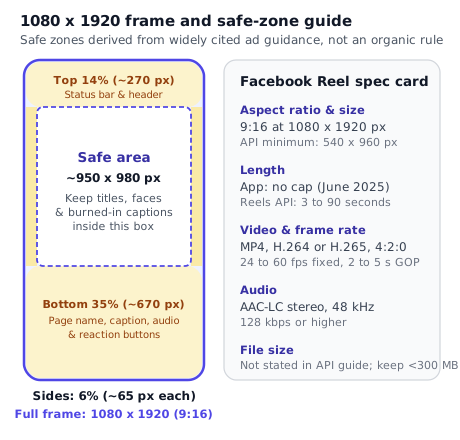
If you burn subtitles into your video file so they work across both Facebook and Instagram, place the bottom of the text box at least 560 to 670 pixels above the bottom edge of the 1080x1920 frame. Our guide to adding captions to Reels shows the exact FFmpeg subtitles and .ass margin settings we tested at 1080x1920.
Captions, titles and hashtags on Facebook Reels
In everyday conversation, "captions" can mean two different things: the words burned onto the video frame as someone speaks, or the post text (description) that sits below the video in the feed. Here we are talking about the post text, title and hashtags attached to the Facebook Reel.
What Meta's Reels Publishing API documents for text fields
In the POST /{page-id}/video_reels finish call documented in Meta's Reels Publishing API guide, two text parameters are listed:
description: the text describing the Reel. Meta's documentation explicitly notes thatdescriptionsupports hashtags (for example#cooking).title: an optional title for the Reel.
What about a maximum character count or hashtag cap on Facebook Reels? As of 17 October 2026, Meta's Reels Publishing API guide does not state a maximum character length or a maximum number of hashtags for description or title on Facebook Reels. Because no official Meta page we read gives a character limit for Facebook Reel descriptions, we do not invent one.
By contrast, Instagram's IG User Media reference states a hard cap of 2,200 characters, 30 hashtags and 20 @ mentions in the API, while the Instagram app began rolling out a 5-hashtag limit per Reel or post on 18 December 2025. If you write a single caption to use across both platforms, staying well under 2,200 characters and using 3 to 5 specific hashtags keeps you inside Instagram's rules as well.
Why a Facebook caption should not be a raw Instagram copy-paste
Even when you publish the same 9:16 video to both apps, a caption written only for Instagram often reads strangely on a Facebook Page:
- Broken
@handles. Tagging@your_guest_handlein a Facebook Reel description does not link to their Instagram profile. Unless that person or brand has a matching Facebook Page tag, it sits in the Facebook caption as plain text or links to an unrelated account. - "Link in bio" friction. On Instagram, clickable web links in post captions do not work, so creators write "Link in bio". On a Facebook Page, people expect either a direct URL or a clear instruction that fits how Facebook Pages work.
- First-line truncation. On a phone screen, Facebook shows only the first line or two of your Reel description over the bottom of the video before the viewer has to tap "See more". Put your hook and the core point in the first 80 to 100 characters rather than burying it under filler.
Our guide to cross-posting Reels to Facebook and Instagram walks through how to write two tailored captions for the same video in a single workflow.
How tools publish a Facebook Reel: start, upload, finish
Why do scheduling tools enforce rules that the Facebook mobile app does not? Because a tool cannot tap buttons on a phone screen. It has to publish through Meta's Reels Publishing API for Pages. Understanding the three HTTP calls behind that API makes every limit, status message and error code make immediate sense.
Permissions and tokens required before the first call
Before an application can call the Reels Publishing API on behalf of your Facebook Page, Meta's guide lists four requirements:
- Target destination: Reels can be published only to Facebook Pages (not personal profiles and not groups).
- Audience: only the public audience is offered for API-published Reels.
- Permissions (scopes): the app needs
pages_show_list,pages_read_engagementandpages_manage_posts. - Page access token and task role: every call uses a Page access token requested from a person who can perform the
CREATE_CONTENTtask on that Page (called "Content" or "Full control" in Page settings). If your account role on the Page is missing that task, the API refuses to start an upload. Need to verify your Page connection and roles? See our step-by-step guide to connecting Instagram to a Facebook Page.
One documentation quirk worth noting if you read Meta's developer guide directly: Meta's own examples mix the parameter names upload_phase and uploading_phase when referring to the phase of the upload. In the actual request query strings, the parameter sent to /{page-id}/video_reels is upload_phase, while the status object returned by GET /{video-id}?fields=status contains an object named uploading_phase.
All request snippets below are illustrations derived from Meta's v25.0 documentation using placeholder IDs ({page-id}, {video-id}) and placeholder tokens ({page-access-token}).
Step 1: Initialize the session (upload_phase=start)
First, the tool sends a POST request to https://graph.facebook.com/v25.0/{page-id}/video_reels with upload_phase=start and the Page access token:
POST https://graph.facebook.com/v25.0/{page-id}/video_reels
Content-Type: application/json

{
  "upload_phase": "start",
  "access_token": "{page-access-token}"
}
Meta responds with two values:
video_id: the unique numeric identifier for the new Reel draft on Facebook.upload_url: the upload endpoint onrupload.facebook.com, formatted ashttps://rupload.facebook.com/video-upload/v25.0/{video-id}.
Step 2: Upload the video bytes or provide a hosted file_url
Next, the tool sends the video to the upload_url returned in Step 1 (https://rupload.facebook.com/video-upload/v25.0/{video-id}). Meta's guide documents two ways to deliver the file:
- Direct binary upload: the tool sends the raw binary bytes of the MP4 file in the
POSTbody, with headersAuthorization: OAuth {page-access-token},offset: 0andfile_size: {size-in-bytes}. - Hosted file upload (
file_url): instead of streaming bytes from the client, the tool passes afile_urlheader pointing to a publicly reachable URL where Meta's crawler can download the MP4 file itself:
POST https://rupload.facebook.com/video-upload/v25.0/{video-id}
Authorization: OAuth {page-access-token}
file_url: https://cdn.example.com/reels/sample-reel.mp4
When the upload completes, rupload.facebook.com returns {"success": true}.
How interrupted uploads resume (bytes_transfered)
If a binary upload drops halfway through because of a network blip, the tool does not have to throw away the video_id right away. It can query the video's status (GET /{video-id}?fields=status) and inspect status.uploading_phase.bytes_transfered (note Meta's spelling with one r in bytes_transfered). The tool then sends another POST to rupload.facebook.com/video-upload/v25.0/{video-id} with the offset header set to that exact bytes_transfered number and streams the remaining bytes. Meta's guide notes that if resuming fails, the tool must start a fresh session from Step 1.
Step 3: Finish and publish (or schedule) the Reel (upload_phase=finish)
Once the bytes are uploaded, the tool calls POST /{page-id}/video_reels a second time, passing the video_id, upload_phase=finish, the description (and optional title), and a video_state value:
PUBLISHED: publishes the Reel publicly as soon as processing finishes.DRAFT: saves the Reel as an unpublished draft on the Page.SCHEDULED: schedules the Reel for a future Unix timestamp passed inscheduled_publish_time(which must be more than 10 minutes in the future and at most 29 days out).
POST https://graph.facebook.com/v25.0/{page-id}/video_reels?access_token={page-access-token}&video_id={video-id}&upload_phase=finish&video_state=PUBLISHED&description=Fresh%20batch%20ready%20%23bakery
Checking processing status (GET /{video-id}?fields=status)
Finishing the upload does not mean the Reel is already live on the Page. Facebook still has to decode, validate and transcode the video. A tool tracks progress by calling:
GET https://graph.facebook.com/v25.0/{video-id}?fields=status&access_token={page-access-token}
Meta returns a status object with four top-level keys:
video_status: the overall state of the video, which can beuploading,upload_complete,processing,ready,error,expiredorupload_failed.uploading_phase: tracks the byte transfer, includingstatus(not_started,in_progress,complete,error) andbytes_transfered.processing_phase: tracks server-side transcoding and spec validation (not_started,in_progress,complete,error). It is duringprocessing_phasethat spec errors such as1363040(aspect ratio),1363127(resolution),1363128(duration) and1363129(frame rate) are raised.publishing_phase: tracks whether the Reel has been published or scheduled (not_started,in_progress,complete,error), along withpublish_statusandpublish_time.
If you want to compare this three-step Page flow (start, upload, finish) with how Instagram's Graph API creates and polls media containers on /{ig-user-id}/media, read our Instagram Reels API guide.
Limits that apply when a tool posts your Reel
Beyond the video's pixel dimensions and codecs, Meta's Reels Publishing API guide sets operational rules that apply whenever a tool publishes on your behalf. Knowing these prevents mysterious failures on busy publishing days.
1. Maximum 30 API-published Reels per Page per rolling 24 hours
Meta caps each Facebook Page at 30 API-published posts within a 24-hour rolling period. That is a rolling window, not a midnight-to-midnight reset: if you publish 30 Reels at 14:00 on Tuesday, the quota frees up around 14:00 on Wednesday.
In addition, general Graph API calls are governed by Meta's Graph API rate limiting rules (including Pages API error code 32 and application or user throttling codes 4, 17 and 341, tracked via the X-App-Usage and X-Business-Use-Case-Usage response headers). When a rate limit is reached, Meta's documentation instructs apps to stop making API calls and wait before retrying.
How does PublishClip handle this? Instead of firing blind requests or dropping your scheduled post when a rate-limit or temporary error occurs, PublishClip tracks your per-account publishing quota and defers retryable jobs with backoff so your queue continues cleanly once the window opens.
2. Scheduling window: 10 minutes to 29 days in the API (and how tools go further)
When a tool asks Meta to hold a scheduled Facebook Reel by passing video_state=SCHEDULED and scheduled_publish_time in the finish call, Meta requires the timestamp to be more than 10 minutes in the future and no more than 29 days (700 hours) ahead.
What if you schedule inside the Facebook mobile app with a paid Meta One subscription? As of 17 October 2026, Meta's help page for scheduling Facebook posts with Meta One (launched in September 2026) states that subscribers on Meta One Advanced, Expert or Max can schedule up to a year (365 days) in advance on mobile devices, and notes that a scheduled Facebook post in that flow cannot be edited — you have to delete it and recreate it.
What if you use a scheduler like PublishClip that holds the video in its own queue and calls the API with video_state=PUBLISHED at the scheduled minute? Because the tool holds the video until post time rather than handing it to Meta's 29-day SCHEDULED state early, you are not restricted to the API's 29-day horizon. Our guide to scheduling Reels compares every free and paid scheduling window side by side.
3. Hosted file (file_url) rules: robots.txt, facebookexternalhit/1.1 and fbcdn
When a tool uploads your Reel using the file_url header in Step 2, Meta's servers fetch the MP4 file directly from the hosting server. Meta's Reels Publishing API guide lists five strict rules for that URL:
- No
robots.txtblocks: the API rejects sites that restrict access viarobots.txt. - Allow Meta's crawler user agent: the host must allow the
facebookexternalhit/1.1user agent to fetch the file. - No
fbcdnURLs: links hosted onfbcdn(Facebook's own content delivery network) are rejected. You cannot take a video URL from an existing Facebook post and pass it back into the API. - Protocol: only
httpandhttpsURLs are supported. - No authentication walls: URLs that require a login header, cookie or session prompt are not supported (signed object-storage URLs that carry their signature in the query string work as long as
facebookexternalhit/1.1canGETthem directly and the signature has not expired at publish time).
4. Collaborator invitations: 10 per Page per 24 hours
If a tool uses the Reels API to invite another Facebook Page as a collaborator on a Reel, Meta limits collaborator invitations to 10 per Page within a 24-hour period.
5. Originality rules on Facebook Reels (March 2026 update)
Technical specs get your video uploaded; content policy determines whether Facebook recommends it. On 12–13 March 2026, Meta published a newsroom update on rewarding original creators on Facebook. Meta defines original content as content "filmed or produced directly by a creator or owner of a Profile or Page", and warns that low-value edits to someone else's video — such as "adding borders, inserting captions, and changing the reel's speed" — count as unoriginal. Accounts that repeatedly post unoriginal videos "may see their account deemed non-recommendable and demonetized". Always export from your own original timeline rather than re-uploading scraped clips with a border.
Thumbnails and covers on Facebook Reels
A strong cover image keeps your Page's Reels tab tidy and tells visitors what each video is about before they tap play. Here again, the app and the API behave differently:
- In the Facebook app and Meta Business Suite: when you upload a Reel manually, the composer lets you pick a frame from the video or upload a custom vertical image (
9:16, ideally1080x1920) as the cover thumbnail. - In Meta's Reels Publishing API for Pages: the three-step
/video_reelsworkflow (start,upload,finish) has nocover_urlorthumb_offsetparameter. Meta's Reels Publishing API guide mentions custom thumbnails only by linking out to separate general Graph API video thumbnail documentation, not as part of the three Reels calls.
Because the Facebook Reels API calls do not accept a cover parameter, a Reel published to Facebook through PublishClip gets Facebook's automatically selected frame. On Instagram, by contrast, the POST /{ig-user-id}/media endpoint explicitly supports cover_url (a JPEG up to 8 MB) and thumb_offset (in milliseconds), so PublishClip sets custom covers on Instagram Reels only.
If you design custom covers for Instagram or upload them manually on Facebook, design at 1080x1920 (9:16) and keep key text inside the central safe area so it survives both the full 9:16 Reels tab and Instagram's profile grid crop. Our Instagram Reel cover size and safe zones guide has the full pixel templates.
Spec error codes you may see
When a Facebook Reel fails during the upload or processing phase in a scheduling tool or custom integration, Meta's API returns a numeric error code. The table below decodes the four specification error codes listed in Meta's Reels Publishing API guide, plus the most common Graph API error codes that show up alongside them.
| Error code | What Meta's API says | Plain-English cause | How to fix it |
|---|---|---|---|
1363040 | Your video's aspect ratio isn't supported. Please upload a video with aspect ratio between 16x9 and 9x16. | The video's width-to-height ratio is outside the validator's allowed range, or pixel aspect ratio metadata is malformed. | Re-export at 1080x1920 (9:16) with square pixels (setsar=1). |
1363127 | The video file you selected is in a resolution that we don't support. Please try again with a minimum resolution of 540x960p (1080x1920p recommended). | Either width is under 540 pixels or height is under 960 pixels (often happens when a 720p or 480p horizontal clip is cropped or rotated wrongly). | Export at 1080x1920 pixels (never below 540x960). |
1363128 | The video file you selected is in a duration that we don't support. Please try again with a video file in a duration between 3 seconds and 90 seconds. | The video is shorter than 3.0 seconds or longer than 90.0 seconds. Even 90.04 seconds from an audio tail can trigger this in the API. | Trim the timeline to between 3 and 90 seconds (for example -t 89.5 if cutting near the limit). |
1363129 | The video file you selected is in a frame rate that we don't support. Please try again with a video file in a frame rate between 24fps to 60fps (fixed frame rate). | The video is below 24 fps, above 60 fps (such as 120 fps slow-motion footage), or uses variable frame rate (VFR). | Re-encode at a constant 30 fps (-r 30 in FFmpeg). |
190 / 102 | Invalid OAuth 2.0 Access Token / Session key invalid or no longer valid. | Your Facebook connection expired, your password changed (subcode 460), or your account hit a security checkpoint (subcode 459). | Reconnect your Facebook account in the publishing tool and retry. |
10 / 200–299 | Permission denied. | The app is missing pages_manage_posts, pages_read_engagement or pages_show_list, or your user lacks the CREATE_CONTENT task on the Page. | Grant all requested Page permissions during login and confirm you have Content or Full control on the Page. |
32 / 4 / 17 / 341 | Page-level or application-level rate limit reached. | Too many API calls or more than 30 API-published Reels on the Page in 24 hours. | Stop calling the API, wait for the rolling window to clear, and retry later. |
Seeing a different code, an Instagram 22070xx subcode, or a Reel that stays stuck on "Processing"? Open our full Instagram and Facebook Reel not uploading troubleshooting guide, which decodes more than 20 Meta error codes and tells you whether each one is safe to retry.
A Facebook Reels export checklist
Before you export your next batch of Reels — or save an export preset in Premiere Pro, Final Cut Pro, DaVinci Resolve, CapCut or FFmpeg — run through these ten checks:
- Canvas size:
1080 x 1920pixels (9:16vertical), square pixels (SAR 1:1). Never below540 x 960. - Duration: between 3 and 90 seconds if any scheduling tool or API will touch the file (and under 90.0 seconds including audio tails).
- Frame rate: 30 fps constant (fixed) frame rate (or any fixed rate from 24 to 60 fps; never variable frame rate).
- Container:
.mp4with themoovatom at the front (-movflags +faststart) and zero edit lists (-use_editlist 0). - Video codec: H.264 (
libx264), High profile, progressive scan, 8-bityuv420p(4:2:0chroma subsampling). - Keyframe interval (GOP): closed GOP of 2 to 5 seconds (
-g 60 -sc_threshold 0 -bf 0gives a keyframe every 60 frames, about 2 seconds at 30 fps). - Audio track: AAC-LC, stereo (2 channels), 48 kHz (
48000 Hz), 128 kbps or higher. - File size and bitrate: keep under 300 MB and under 25 Mbps video bitrate so the exact same file passes Instagram's API too.
- Safe zones: keep titles, logos, key faces and burned-in captions inside the central 950 x 980 pixel box (clear of the top 14%, bottom 35% and outer 6% margins).
- Browser check: if you use PublishClip, drop your 9:16 clip into the composer — PublishClip validates the 9:16 ratio and 3-to-90-second duration and converts the file to compliant H.264/AAC MP4 directly in your browser using
ffmpeg.wasmbefore uploading, so your raw file never has to be transcoded on a remote server.
Key takeaways
- The standard Facebook Reels size is 1080 by 1920 pixels (
9:16vertical), with540 by 960pixels as the minimum accepted by Meta's Reels Publishing API. - On 17 June 2025, Meta announced that all videos on Facebook are shared as Reels and that Reels in the app no longer have length or format restrictions (confirmed in a September 2025 Facebook Help note).
- Meta's Reels Publishing API for Pages — which every third-party scheduling tool uses — still enforces a 3 to 90 second duration limit (error
1363128), a 24 to 60 fps fixed frame rate (error1363129), and a cap of 30 API-published Reels per Page per rolling 24 hours. - Meta's Facebook Reels API guide states no maximum file size. Keeping your export under 300 MB and 25 Mbps ensures the same master file also passes Instagram's Reels API.
- Export as
.mp4with H.264 High profile (yuv420p), a closed GOP of 2 to 5 seconds, stereo 48 kHz AAC-LC audio at 128 kbps+,-movflags +faststartand-use_editlist 0 -bf 0. - Keep important text and burned-in captions inside the central 950 by 980 pixel safe area (outside the top 14%, bottom 35% and side 6% overlay bands derived from Meta's ad guidance).
Frequently asked questions
Short answers to common questions about Facebook Reels size, length, file format and scheduling rules.
How long can a Facebook Reel be?
It depends on how you post it. Inside the Facebook app or on Facebook's website, Meta announced on 17 June 2025 that all Facebook videos are shared as Reels without length or format restrictions, and Facebook Help confirms this applies regardless of length. However, if you publish or schedule through a third-party tool that uses Meta's Reels Publishing API for Pages, the video must be between 3 seconds and 90 seconds long (error code 1363128 rejects anything outside that range). If you cross-post through a tool, keep every Reel between 3 and 90 seconds.
What is the best size for Facebook Reels?
The best Facebook Reels size is 1080 by 1920 pixels, which is a 9:16 vertical aspect ratio with square pixels. That matches the recommended resolution in Meta's Reels Publishing API guide and fills a modern phone screen without upscaling blur. The API enforces a minimum resolution of 540 by 960 pixels (error code 1363127). Keep titles, faces and burned-in subtitles inside the central 950 by 980 pixel area so the app's top bar, bottom caption and right-side buttons do not cover them.
Can I post a horizontal video as a Facebook Reel?
Yes in the Facebook app, where Facebook Help notes as of September 2025 that all uploaded videos are shared as Reels regardless of orientation, and even in the API error 1363040 says ratios between 16:9 and 9:16 are accepted. Even so, a horizontal 16:9 video looks tiny inside a vertical phone player, occupying less than a third of the screen's height. For the sharpest result, convert horizontal footage to 9:16 (1080x1920) before uploading by cropping the centre, reframing, using a blurred background fill or stacking two shots.
Are Facebook Reels the same as Instagram Reels?
They share the same 9:16 vertical canvas (1080x1920), H.264 video codec and AAC audio format, so one master MP4 file can be published to both platforms. Their rules differ in three places: length (Facebook's API takes 3 to 90 seconds while Instagram's API takes 3 seconds to 15 minutes), daily API limits (30 per 24 hours on a Facebook Page versus 50 to 100 on Instagram), and covers (Instagram's API accepts a custom cover image or frame offset, whereas Facebook's three-step Reels API has no cover parameter).
How big can a Facebook Reel file be?
As of 17 October 2026, Meta's Reels Publishing API guide and Facebook's public help pages do not state a maximum file size for Facebook Reels. The 1 GB and 4 GB numbers you see on other blogs are not in Meta's current Reels documentation. If you want one file that works everywhere, follow Instagram's documented API limit of 300 MB and a maximum video bitrate of 25 Mbps. At 1080x1920 and 30 fps in H.264, a 60-second Reel is usually 25 MB to 75 MB.
Can I schedule Facebook Reels?
Yes. You can schedule Facebook Reels in Meta Business Suite, in the Facebook mobile app (where Meta One Advanced, Expert and Max subscribers can schedule up to 365 days ahead), through Meta's Reels Publishing API using video_state=SCHEDULED (more than 10 minutes and up to 29 days ahead), or with a free tool like PublishClip that holds your video and publishes it to your Facebook Page at the scheduled minute up to 365 days ahead.
Sources and how this was checked
Last checked: 17 October 2026. We opened each primary source below on 16 and 17 October 2026 and ran the FFmpeg 6.1.1 and ffprobe checks on the same dates. Meta updates its developer guides and help pages without notice, so check the live documentation before building against a limit.
Meta for Developers
- Reels Publishing API for Pages — the video specifications table (9:16, 1080x1920 recommended, 540x960 minimum, 3 to 90 seconds, 24 to 60 fps fixed, H.264/H.265/VP9/AV1, closed GOP 2 to 5 seconds, 4:2:0, AAC-LC stereo 48 kHz 128 kbps+), the
start/upload/finishendpoints, status fields, hosted-file rules, the 30-posts-per-24-hours limit, the 10-minutes-to-29-daysSCHEDULEDwindow, and error codes1363040,1363127,1363128and1363129. - IG User Media reference (
POST /{ig-user-id}/media) — Instagram's Reel video specifications (including the 300 MB file-size cap, 25 Mbps VBR cap,moovatom at the front, no edit lists, 3 seconds to 15 minutes, andcover_url/thumb_offset). - Graph API Rate Limiting and Graph API Error Handling — rate-limit headers and error codes
1,2,4,10,17,32,102,190and341.
Meta newsroom and help pages
- Making It Easier to Create Videos on Facebook (17 June 2025, updated 14 July 2025) — announcement that all videos on Facebook are shared as Reels with no length or format restrictions and that the Video tab becomes the Reels tab.
- Facebook Help: Unable to view or play reels — September 2025 update note stating that all videos posted to Facebook will be shared as Reels, regardless of length or orientation.
- Rewarding Original Creators on Facebook (12–13 March 2026) — originality guidance on borders, captions and speed changes on third-party clips.
- Meta Business Help Center: Create a Facebook Reel and About text overlays and the safe zone for ads in Stories and Reels.
- How to create and schedule Facebook posts with Meta One and Introducing Meta One (15 September 2026).
Encoding and container verification
- FFmpeg H.264 Video Encoding Guide — tested locally with FFmpeg and
ffprobe6.1.1-3ubuntu5on 16 and 17 October 2026.
What we could not confirm
- Script-rendered help articles. Several Meta Business Help Center pages (including the body text of
facebook.com/business/help/2683452421955589and980593475366490) render their text with client-side scripts that automated fetches could not read in full; where we refer to safe-zone percentages (14%top,35%bottom,6%sides), we label them explicitly as a conservative design rule rather than a mandatory organic Facebook rule. - In-app handling of non-9:16 uploads and rollout stragglers. We did not test how the current mobile app crops or pads horizontal uploads across devices, or whether any accounts still see a legacy 90-second trim bar during Meta's gradual rollout.
- Unstated caps. We found no official Meta page stating a maximum file size or a maximum caption character count for Facebook Reels.
About this guide
This guide was written and fact-checked by the team behind PublishClip, a free tool for scheduling and publishing Facebook and Instagram Reels. Where we describe PublishClip's own behaviour — such as browser-side H.264/AAC conversion with ffmpeg.wasm, the 3 to 90 second limit and Instagram-only custom covers — those details match our codebase on 17 October 2026. Spot a change in Meta's docs? Let us know.